Author: PointsYeah Editorial Team

  • When Does It Make Sense to Buy Points and Miles?

    When Does It Make Sense to Buy Points and Miles?

    Every so often, airlines and hotels put their points and miles on sale.

    If you’ve ever come across one of those promotions, you may have wondered why anyone would spend money buying points instead of simply paying for the trip.

    The answer depends on what you’re trying to book.

    Most of the time, buying points isn’t necessary. But every now and then, purchasing points or miles can lower the cost of your trip or unlock a flight or hotel that would otherwise cost much more.

    Here’s when buying points and miles can make sense, and when it’s probably better to keep your wallet in your pocket.

    How Buying Points and Miles Works

    Most airline and hotel loyalty programs let members purchase points or miles directly through their websites, though the transaction is often processed by a third party such as Points.com.

    Instead of earning points by flying, staying at a hotel, or spending on a travel credit card, you’re just buying the points or miles you need.

    Sometimes you’ll pay the standard price. Other times, loyalty programs run limited-time promotions that offer bonus points or discounts, making those purchases much more attractive.

    Buying points doesn’t automatically save you money, though. Whether it’s a good deal depends entirely on how you plan to use them.

    That’s why the first question shouldn’t be, “Are points on sale?”

    It should be, “What am I trying to book?”

    Young woman passenger waiting for flight at airport lounge.She is using digital tablet to surf internet and make a online check in
    MSTUDIOIMAGES / ISTOCK

    Search First. Buy Second.

    Before purchasing points, make sure the flight or hotel you want is available.

    Award availability can change quickly, and buying points before confirming you can use them could leave you with a balance you weren’t planning to keep.

    A better approach looks like this:

    • Find the flight or hotel you want.
    • Compare the cash price with the points price.
    • Calculate what it would cost to buy any points you’re missing.
    • If buying points costs less than paying cash, it may be worth it.

    In other words, buy points for a trip you’re ready to book, not simply because they’re on sale.

    PointsYeah makes this process easier by showing live award availability across supported airline and hotel loyalty programs, allowing you to compare your options before deciding whether buying points is worth it.

    {{ search-widget mode=”flight-hotel” }}

    More on This: How to Search for Award Flights with PointsYeah

    When Buying Points Can Make Sense

    Buying points isn’t something you’ll do for every trip, but there are a few situations where it can be worth considering.

    You’ve already found the award you want

    This is one of the best reasons to buy points.

    Imagine a hotel stay costs $400 if you pay cash.

    The same stay is available for 15,000 points, and buying those points during a promotion costs $300.

    In that case, purchasing the points saves you money while booking the same stay.

    How cool is that?

    You’re only a few points short

    Sometimes you’re on the cusp of a redemption.

    If you already have most of the points needed for a flight or hotel stay, buying the remaining amount can be less expensive than paying cash for the entire reservation.

    There’s a promotion worth taking advantage of

    Airline and hotel loyalty programs regularly offer bonus points or discounts when purchasing points.

    A promotion by itself isn’t a reason to buy points, but it can improve the math if you’ve already found the redemption you want.

    When You Probably Shouldn’t Buy Points

    Buying points isn’t always a good deal. In fact, there are plenty of situations where paying cash or using another redemption option is the better choice.

    You may want to skip buying points if:

    • You don’t have a specific trip in mind.
    • You haven’t confirmed award availability.
    • You’re buying simply because there’s a sale.
    • The cash price is already competitive.
    • You’d need to buy far more points than you actually plan to use.

    If you’re not ready to book, it’s usually better to keep your money in your pocket. Once you’ve found the trip you’re ready to book, you can compare the cost of buying points with your other booking options and decide which makes the most sense.

    Young couple arriving on hotel room with wheeled luggage
    FG TRADE LATIN / ISTOCK

    Check Current Promotions

    Airline and hotel loyalty programs regularly offer bonus points or discounts when you buy points. Purchasing during one of these promotions will usually get you a better rate than buying at the standard price.

    Once you’ve decided buying points makes sense for your trip, the next question is whether there’s a promotion available.

    Our Current Promotions to Buy Airline Miles and Hotel Points guide tracks the latest bonus offers and discounts from major airline and hotel loyalty programs.

    This makes it easy to see whether you can stretch your money a little further before you buy.

  • November 2026 Credit Card Transfer Bonuses: Amex, Chase, Capital One & Citi

    November 2026 Credit Card Transfer Bonuses: Amex, Chase, Capital One & Citi

    Thinking about transferring your credit card points?

    Every so often, banks run promotions that give you more airline miles or hotel points when you transfer from an eligible credit card rewards program. Instead of receiving the usual number of miles or points, you might receive 20%, 50%, or even more.

    Below, you’ll find the current transfer bonuses from major credit card rewards programs, along with each offer’s expiration date.

    Current Transfer Bonuses

    Transfer bonuses come and go throughout the year. The table below is automatically updated as new offers begin and existing ones expire.

    {{ transfer-bonus-table }}

    Before You Transfer Your Points

    A 30% credit card transfer bonus might sound like a great deal, but transferring points just because there’s a promotion isn’t always the best thing to do.

    Before transferring, it’s worth finding a flight or hotel you actually want to book. You can use PointsYeah to see what’s available to book with points across supported airline and hotel loyalty programs.

    If you’ve found something that works and there’s an applicable transfer bonus, you may be able to book it with fewer credit card points than usual.

    Just remember that transfers are irreversible. Once your credit card points become airline miles or hotel points, you can’t move them back.

    Transferring without a specific redemption in mind could leave you with points that are harder to use than the flexible rewards you started with.

    Historical Transfer Bonuses

    Transfer bonuses rarely follow a set schedule.

    Some loyalty programs run promotions several times a year, while others may go months without offering another one.

    Expand a credit card rewards program below to browse its previous transfer bonuses. You’ll be able to see which loyalty programs have received bonuses in the past, how large those bonuses were, and when they were offered.

    {{ transfer-bonus-history }}

    Earn More Points With These Credit Cards

    Whether you’ve already used some of your points or want to build up your balance for a future transfer bonus, these two credit cards can help. Each currently offers a welcome bonus to eligible new cardholders.

    Click “Learn More” for details on each offer.

    {{ credit-card-widget uri=”chasesapphire” }}

    {{ credit-card-widget uri=”venture” }}

    More on This: Find the Best Cards to Power Your Points

  • How Credit Card Transfer Partners Work

    How Credit Card Transfer Partners Work

    If you’ve ever searched online for ways to use your credit card points, you’ve probably come across advice like, “Transfer your points to an airline partner instead.”

    That sounds straightforward enough.

    But if you’ve never done it before, it’s also a fair question to ask: What’s an airline partner, and why would I transfer my points there instead of just using them through my credit card?

    The answer is pretty simple.

    What Is a Credit Card Transfer Partner?

    A transfer partner is an airline or hotel loyalty program that accepts transfers from an eligible credit card rewards program.

    Think of your credit card points as one currency and airline miles as another. A transfer partner is what allows you to exchange one for the other.

    For example, if you have Chase Ultimate Rewards points, you can transfer them to programs like United MileagePlus or Air Canada Aeroplan.

    Once the transfer is complete, your Chase points become airline miles in that program. And they’re yours to use when you’re ready to book a flight.

    The same idea applies to hotels. Lots of credit card rewards programs also let you transfer points to participating hotel loyalty programs.

    Young couple walking in the train station, pulling suitcase and wearing backpacks, ready for vacation
    LORDHENRIVOTON / ISTOCK

    Why Do Credit Card Transfer Partners Matter?

    Transfer partners matter because they give you choices in how you redeem your rewards. And who doesn’t like choices?

    Imagine you’re planning a trip to London.

    You might assume you need to redeem your credit card points through your bank’s travel portal. But if your points can be transferred instead, you may have several different airline loyalty programs that can book the same trip.

    In some cases, transferring your points may require fewer points than booking through your bank’s travel portal. If a credit card transfer bonus is available, that number could be even lower.

    Having transfer partners gives you more ways to use your points instead of relying on other redemption options, such as booking through your bank’s travel portal, covering purchases on your credit card statement, or redeeming points for gift cards.

    Not Every Credit Card Has the Same Transfer Partners

    Each credit card rewards program has its own list of airline and hotel transfer partners.

    For example, Chase Ultimate Rewards includes United MileagePlus as a transfer partner, while American Express Membership Rewards partners with Delta SkyMiles.

    Capital One Miles, Citi ThankYou Rewards, Bilt Rewards, U.S. Bank Altitude Rewards, and Wells Fargo Rewards all have their own mix of airline and hotel partners.

    If you’re looking for a complete list of transfer partners and instructions for moving your rewards, see our guide on how to convert credit card points to airline miles.

    Smiling woman sitting on sofa with suitcase next to her, holding smartphone and credit card, booking travel tickets online, getting ready for vacation.
    MILADIN PUSICIC / ISTOCK

    Search Before You Transfer

    One of the most important things to remember is that transferring points is a one-way transaction.

    Once your credit card points become airline miles or hotel points, you can’t transfer them back. That’s why it’s always a good idea to search for the award you want before transferring your points.

    PointsYeah makes this process easier by showing live award availability across supported airline and hotel loyalty programs.

    {{ search-widget mode=”flight-hotel” }}

    Once you’ve found the flight or hotel you want, you can identify the appropriate transfer partner, check for any available transfer bonuses, and transfer only the points you need to complete your booking.

  • What’s a Credit Card Transfer Bonus?

    What’s a Credit Card Transfer Bonus?

    If you’ve ever seen an offer like “Transfer your points and get 25% more Flying Blue miles,” you might have wondered what that actually means in the simplest of terms.

    That’s a credit card transfer bonus.

    Instead of receiving the normal number of airline miles or hotel points when you transfer rewards, a transfer bonus gives you a little something extra for making the same transfer.

    Here’s how transfer bonuses work, when they can be useful, and how to keep track of current offers.

    What Is a Credit Card Transfer Bonus?

    A credit card transfer bonus is a limited-time promotion that increases the number of airline miles or hotel points you receive when transferring rewards from an eligible credit card program.

    For example, imagine you transfer 10,000 Chase Ultimate Rewards points to Air France-KLM Flying Blue.

    Under normal circumstances, 10,000 Chase Ultimate Rewards points become 10,000 Flying Blue miles.

    During a 25% transfer bonus, those same 10,000 Chase Ultimate Rewards points become 12,500 Flying Blue miles.

    KLM Boeing 787 Dreamliner airplane landing at Schiphol airport on the Polderbaan. KLM stands for Koninklijke Luchtvaart Maatschappij,  Royal Dutch Airlines and is part of Air France–KLM. The Boeing 787 alos called Dreamliner is a wide-body jet airliner by American manufacturer Boeing Commercial Airplanes. Schiphol is one of the busiest and largest airports in Europe, located near Amsterdam, Netherlands. It serves as a major hub for international flights and is a key gateway to Europe.
    SJO / ISTOCK

    You’re transferring the same number of credit card points. The transfer bonus simply gives you more airline miles or hotel points once the transfer is complete.

    Those extra miles or points may not sound like much at first, but they can reduce the number of credit card points needed for a trip. And those savings can add up over time.

    Which Credit Card Programs Offer Transfer Bonuses?

    Transfer bonuses are most commonly offered by flexible rewards programs (credit card rewards that can be transferred to multiple airline and hotel loyalty programs).

    These often include:

    • American Express Membership Rewards
    • Bilt Rewards (typically on the first of the month as part of Rent Day promotions)
    • Capital One Miles
    • Chase Ultimate Rewards
    • Citi ThankYou Rewards

    Each program runs promotions throughout the year, and the participating airline or hotel partners can vary from one offer to the next.

    Young couple enjoying breakfast in a modern kitchen, using a smartphone and credit card for convenient online grocery shopping, fostering connection and togetherness during their morning routine
    MILORAD KRAVIC / ISTOCK

    How to Find Current Transfer Bonuses

    Transfer bonuses come and go throughout the year, and each bank runs promotions on its own schedule.

    Understandably, keeping track of them across multiple rewards programs can quickly become a chore.

    PointsYeah keeps an up-to-date list of current credit card transfer bonuses. This makes it easy to see which bank programs and airline or hotel partners are currently offering promotions.

    Even better, when you’re searching for award flights with PointsYeah, eligible transfer bonuses are automatically factored into your search results. That means you can compare your options without having to calculate the bonus yourself.

    POINTSYEAH

    Should You Transfer Points During a Bonus?

    Not necessarily.

    A transfer bonus can make an award booking more attractive, but it doesn’t automatically mean you should transfer your points.

    Before you do anything with your credit card points, it’s worth considering a few things:

    • Is the award flight or hotel actually available?
    • Does transferring points cost less than paying cash?
    • Are you ready to book?

    These questions matter because point transfers can’t be reversed. Once your credit card points become airline miles or hotel points, you can’t transfer them back.

    Put differently, a transfer bonus is best viewed as an opportunity and not a reason to book a trip. If you’ve already found the award you want, a bonus can help your points go a little further. If you haven’t, it’s usually better to keep your points where they are until you’re ready to book.

  • How to Convert Credit Card Points to Airline Miles

    How to Convert Credit Card Points to Airline Miles

    One of the biggest advantages of earning rewards through a travel credit card is the flexibility you have when it’s time to book travel.

    Unlike airline miles, many credit card points can be transferred to multiple airline loyalty programs. Instead of being locked into a single airline, you can choose the program that best suits your trip.

    If you’ve never transferred credit card points before, the process is easier than you might think. And once you understand which airline partners your bank works with, transferring your points usually takes only a few minutes.

    Here’s how to convert your credit card points into airline miles.

    Before You Transfer Your Points

    Before transferring a single point, it’s a good idea to search for the award flight you want.

    Credit card point transfers are one-way. Once your points become airline miles, you can’t transfer them back to your credit card rewards program.

    That’s why it’s usually best to:

    • Search for your award flight first.
    • Confirm that seats are available.
    • Compare the cash price with the points required.
    • Transfer only the number of points you need to complete your booking.

    PointsYeah makes this process much easier by showing live award availability across supported airline programs.

    Search results also identify which transferable credit card currencies can be used for a particular redemption and highlight any applicable transfer bonuses.

    Young woman standing with phone near the airport window waiting for the flight
    ROSSHELEN / ISTOCK

    American Express Membership Rewards

    American Express airline transfer partners

    American Express Membership Rewards points (for US residents) are transferable to the following airline loyalty programs.

    {{ transfer-partner-table bank=”Amex” type=”airline” }}

    Most Amex transfers process instantly, though transfer times can vary by the airline.

    One important exception involves transfers to U.S.-based airline programs such as Delta SkyMiles and JetBlue TrueBlue. American Express charges an excise tax offset fee of 0.06 cents per point transferred (up to a maximum of $99) for these transfers.

    While you can use Membership Rewards points to cover the fee at checkout, you’re generally better off paying it with your American Express card and saving your points for travel.

    How to transfer American Express Membership Rewards

    1. Sign in to your American Express account.
    2. Open Rewards & Benefits, then select Transfer Points.
    3. Choose your airline loyalty program and link your account if necessary.
    4. Enter the number of Membership Rewards points you’d like to transfer.
    5. Review the information and confirm your transfer.

    Bilt Rewards

    Bilt airline transfer partners

    Bilt Rewards Points are transferable to the following airline loyalty programs.

    {{ transfer-partner-table bank=”Bilt” type=”airline” }}

    Most Bilt transfers process instantly, though transfer times can vary by the airline.

    How to transfer Bilt Rewards

    1. Sign in to your Bilt account.
    2. Select the Rewards tab.
    3. Tap Transfer.
    4. Choose your airline partner.
    5. Enter the number of points to transfer and confirm.

    Capital One Miles

    Capital One airline transfer partners

    Capital One Miles are transferable to the following airline loyalty programs.

    {{ transfer-partner-table bank=”Capital One” type=”airline” }}

    Most Capital One transfers process instantly, though transfer times can vary by the airline.

    How to transfer Capital One Miles

    1. Sign in to your Capital One account.
    2. Select View Rewards.
    3. Choose Transfer Rewards.
    4. Select your airline partner.
    5. Enter the number of miles you’d like to transfer and confirm.

    Chase Ultimate Rewards

    Chase airline transfer partners

    Chase Ultimate Rewards points are transferable to the following airline loyalty programs.

    {{ transfer-partner-table bank=”Chase” type=”airline” }}

    Most Chase transfers process instantly, though transfer times can vary by the airline.

    How to transfer Chase Ultimate Rewards

    1. Sign in to your Chase account.
    2. Open Ultimate Rewards.
    3. Select Transfer Points to Partners.
    4. Choose your airline loyalty program.
    5. Enter the number of points you’d like to transfer and confirm.

    Citi ThankYou Rewards

    Citi airline transfer partners

    Citi ThankYou Rewards points are transferable to the following airline loyalty programs.

    {{ transfer-partner-table bank=”Citi” type=”airline” }}

    Note: Transfer ratios vary depending on your Citi ThankYou-earning card. Be sure to confirm the transfer ratio that applies to your account before transferring points.

    Most Citi transfers process instantly, though transfer times can vary by the airline.

    How to transfer Citi ThankYou Rewards

    1. Sign in to ThankYou.com.
    2. Select Points Transfer.
    3. Choose your airline partner.
    4. Enter the number of ThankYou points you’d like to transfer.
    5. Confirm your transfer.

    U.S. Bank Altitude Rewards

    U.S. Bank airline transfer partners

    U.S. Bank Altitude Rewards points are transferable to the following airline loyalty programs.

    {{ transfer-partner-table bank=”US Bank” type=”airline” }}

    Most U.S. Bank transfers process instantly, though transfer times can vary by the airline.

    How to transfer U.S. Bank Altitude Rewards

    1. Sign in to your U.S. Bank account.
    2. Open your rewards dashboard.
    3. Select Transfer Points.
    4. Choose your airline loyalty program.
    5. Enter the number of points to transfer and confirm.

    Wells Fargo Rewards

    Wells Fargo airline transfer partners

    Wells Fargo Rewards points are transferable to the following airline loyalty programs.

    {{ transfer-partner-table bank=”WF” type=”airline” }}

    Most Wells Fargo transfers process instantly, though transfer times can vary by the airline.

    How to transfer Wells Fargo Rewards

    1. Sign in to your Wells Fargo account.
    2. Select Wells Fargo Rewards.
    3. Tap See All Options, then Rewards Points Transfer.
    4. Choose your airline partner.
    5. Enter the number of points you’d like to transfer.
    6. Review the information and submit your transfer.

    Things to Know Before You Transfer

    Transfers are usually final

    In most cases, transfers from a credit card rewards program to an airline loyalty account can’t be reversed.

    Before transferring your points, make sure you’ve found the award flight you want, and you’re ready to complete the booking.

    People using devices to plan trips, check in to hotels and flights, stay connected to family and office. Freelance business concept
    POIKE / ISTOCK

    Transfer times can vary

    Most transfers happen within minutes, but not every airline processes transfers at the same speed.

    Occasionally, transfers may take several hours or even a few days. And your first transfer to a particular airline loyalty program may also take longer than subsequent transfers, especially if your loyalty account hasn’t been linked before.

    While delays are relatively uncommon, they’re worth keeping in mind if you’re booking an award with limited availability.

    Transfer bonuses can stretch your points further

    Banks periodically offer transfer bonuses that increase the number of airline miles you receive from the same number of credit card points.

    For example, a 25% transfer bonus means 10,000 transferable credit card points become 12,500 airline miles instead of the usual 10,000.

    Before transferring your points, check our Current Credit Card Transfer Bonuses guide to see whether an active promotion could help you receive more airline miles.

  • What’s Included with PointsYeah Premium?

    What’s Included with PointsYeah Premium?

    PointsYeah Premium builds on the platform’s free membership with additional tools for searching award flights and hotels, tracking availability, and managing your rewards.

    From longer Live Search windows and expanded alerts to enhanced My Wallet features, Premium is designed for travelers who want more flexibility while planning trips with points.

    Here’s what’s included.

    Pricing

    PointsYeah Premium is available as either a monthly or annual membership.

    Monthly

    • premium_monthly: $19.99 per month

    Annual

    • premium_annual: $119.95 per year

    For travelers who regularly book award flights and hotels, the annual membership offers the best overall value.

    What’s Included

    PointsYeah Premium builds on the free membership with additional planning tools across the platform, including:

    • Longer Live Search windows
    • More active alerts
    • Enhanced My Wallet features
    • United Airlines Upgrade Alerts
    • Custom point valuations
    • Expanded Multi-Region Alert capabilities

    The sections below explain each feature in more detail.

    Search More Award Flights

    Premium expands Live Search, making it easier to compare more flight options in a single search.

    Premium members can:

    • Search up to 8 days instead of 4.
    • Search from up to 2 origin airports.
    • Search up to 2 destination airports.

    You can also search up to 3 origin airports and 3 destination airports in a single search. When using the maximum number of airports on either side, the search window is limited to 4 days instead of 8 to keep searches fast.

    These additional search options reduce the need to run multiple searches and make it easier to compare nearby airports and flexible travel dates.

    Track More Award Opportunities

    Premium includes higher alert limits and additional alert types, allowing you to monitor more trips at once.

    Premium includes:

    Whether you’re waiting for award prices to drop, hotel availability to open, or a United upgrade to become available, PointsYeah continues monitoring in the background and lets you know when something changes.

    Get More from My Wallet

    Every PointsYeah account includes My Wallet, allowing you to track rewards balances across supported loyalty programs.

    Premium enhances My Wallet with:

    • Automatic syncing with select bank and airline loyalty programs
    • Family and Friends Points Wallet, allowing you to manage your household’s rewards in one place

    Instead of tracking multiple accounts individually, Premium helps you organize your rewards and plan trips using points across your household.

    Personalize Your Searches

    Premium includes additional customization tools that help tailor search results to your travel preferences.

    Features include:

    These settings help surface results that better reflect how you value your points and how you like to travel.

    Discover More with Daydream Explorer

    Daydream Explorer is available to all PointsYeah members, but it works especially well alongside Premium’s expanded search capabilities and alerts.

    Browse award flights and hotels across the globe, save Explorer Alerts, and discover destinations based on your travel style before switching to Live Search when you’re ready to book.

    Compare Free and Premium

    While PointsYeah’s free membership includes unlimited Live Search and access to many core features, Premium expands what you can do throughout the platform.

    FreePremium
    Flights: Live Search
    Access to real-time searchesUnlimitedUnlimited
    Number of search days (one-way)Up to 4Up to 8
    Number of origin/destination airports1Up to 2
    View Live Seat Maps✓✓
    Hotels: Live Search
    Search 50,000+ hotels across the globe and compare award prices against cash prices for the most popular chainsUnlimitedUnlimited
    Daydream Explorer
    Free map view for millions of flight and hotel ideas✓✓
    Alerts
    Flight Price Point AlertsUp to 4Up to 32
    Hotel AlertsUp to 4Up to 30
    Multi-Region AlertsUp to 5 (30-day search window)Up to 150 (90-day search window)
    Explorer AlertsUnlimitedUnlimited
    United Airlines Upgrade Alerts✓
    Customization
    Access over 20 personalized filters to make your search match your needs✓✓
    Set custom values per point✓
    Points Wallet
    Access to My WalletManual entryManual & Automatic sync with select bank and airlines programs
    Access to Family and Friends Points WalletYours + up to 4 family accounts

    For a complete feature comparison, visit the PointsYeah Membership page.

    How to Upgrade Your Account

    Upgrading to PointsYeah Premium only takes a few minutes.

    1. Sign in to your PointsYeah account.
    2. Visit the Membership page.
    3. Choose a monthly or annual plan.
    4. Enter any available promo code during checkout.
    5. Complete your purchase and start using Premium features immediately.

    Gift a membership

    Looking for a gift for the traveler in your life? PointsYeah Premium memberships can also be purchased as gifts.

  • How to Use Daydream Explorer to Find Flights and Hotels With Points and Miles

    How to Use Daydream Explorer to Find Flights and Hotels With Points and Miles

    Sometimes the hardest part of planning a trip isn’t finding award availability. It’s deciding where to go.

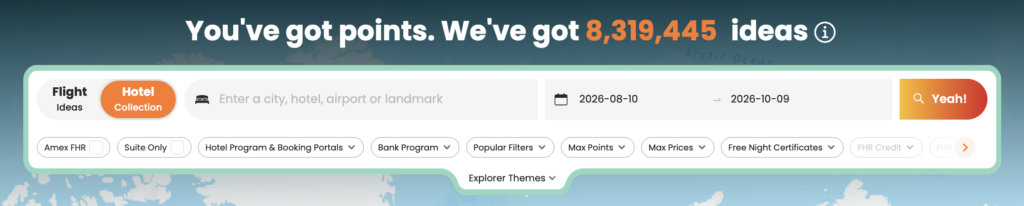
    Daydream Explorer helps you discover destinations, award flights, and hotels when your plans are flexible. Instead of searching one route at a time, you can explore the world using an interactive map, browse award opportunities across regions, and compare both flights and hotels in one place.

    Whether you’re looking for your next vacation or simply seeing where your points can take you, here’s how to get started.

    What Is Daydream Explorer?

    Daydream Explorer helps you discover where your points can take you.

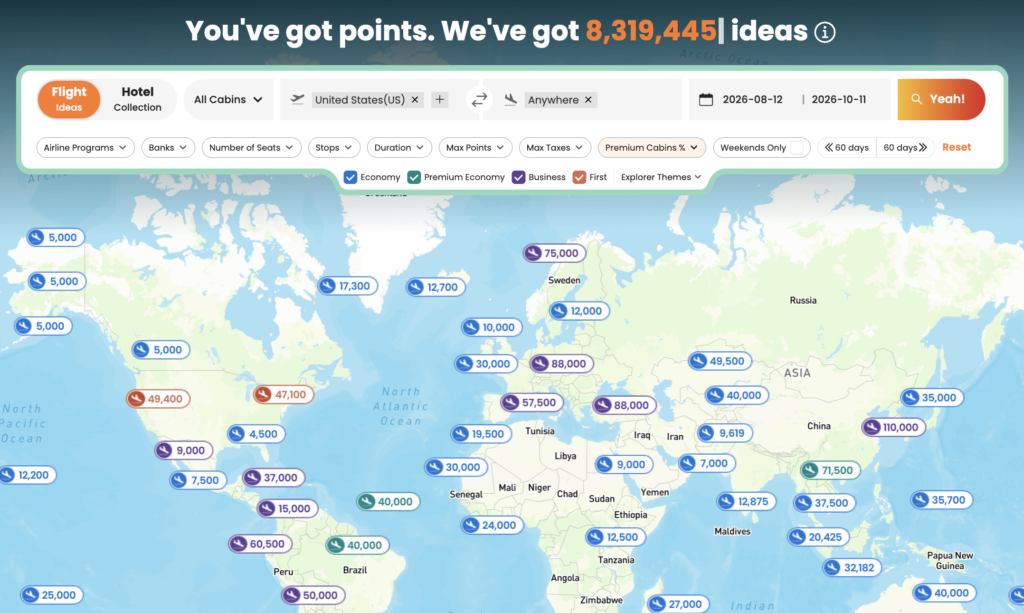
    Unlike Live Search, which starts with a specific route, Daydream Explorer lets you begin with a broader idea. Search from an airport, state, country, region, continent, or even “Anywhere,” then explore destinations that match your travel dates and preferences.

    You can switch between Flights and Hotels at any time, making it easy to discover both award flights and places to stay from a single search.

    POINTSYEAH

    Find Award Flights

    Daydream Explorer makes it easy to discover award flights when you’re flexible about where to travel.

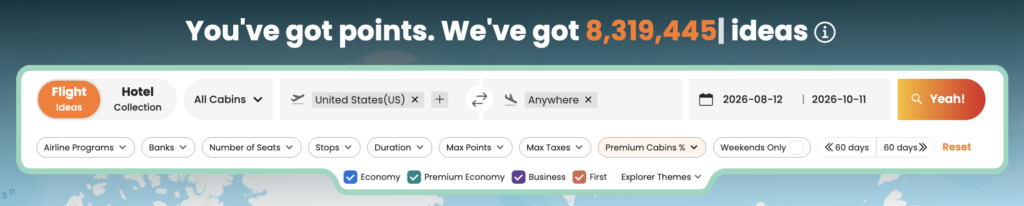
    Start by choosing where you’ll depart from. You can search using:

    • Anywhere
    • Continents
    • Regions
    • Countries
    • States
    • Airports

    Next, choose where you’d like to travel using the same flexible location options.

    POINTSYEAH

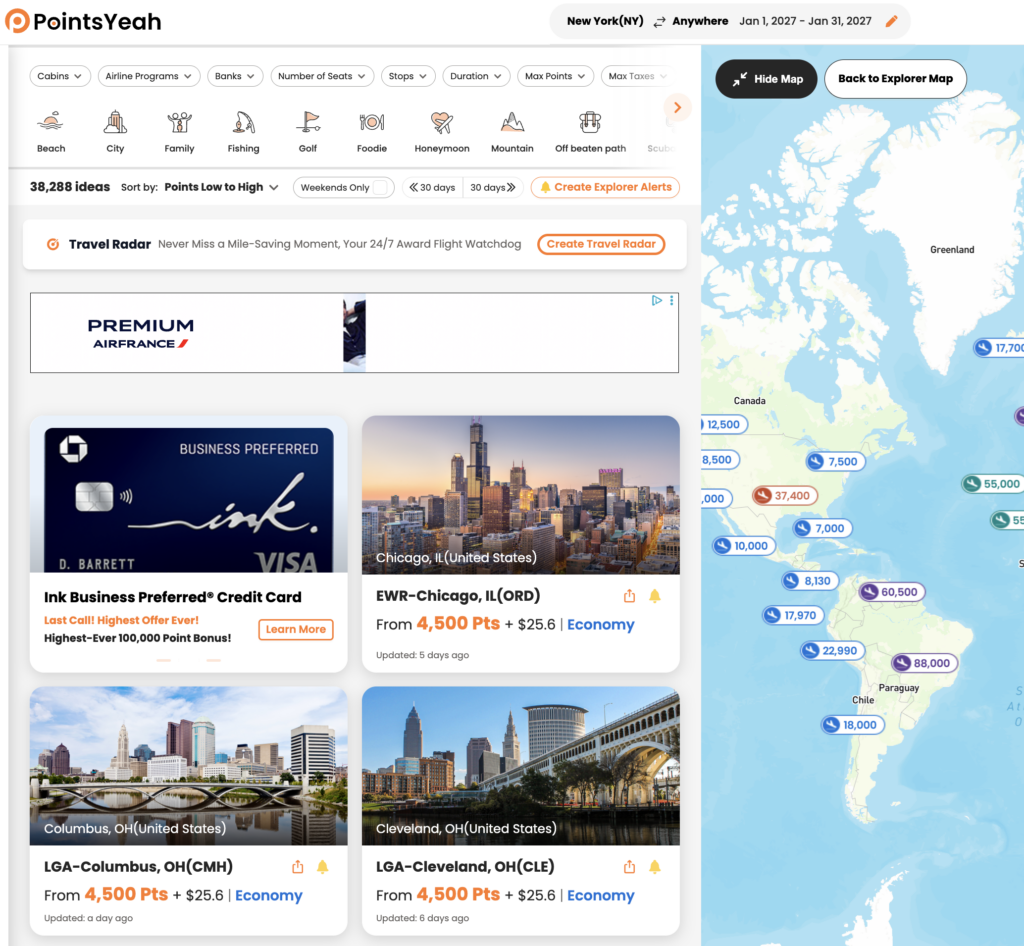
    Once you’ve entered your travel dates, Daydream Explorer displays matching destinations on both an interactive map and a list view. Select any destination to compare award pricing across supported airline loyalty programs, view available cabins, and explore different redemption options.

    When you’re ready to book, select Yeah, Let’s Go to continue your search with Live Search and view real-time availability.

    POINTSYEAH

    Find Award Hotels

    Switch to the Hotels tab to explore hotels you can book with points.

    Search by city, airport, region, country, landmark, or broader destination, then compare hotels across supported loyalty programs using either the interactive map or list view.

    POINTSYEAH

    Each hotel result includes information such as:

    • Award pricing
    • Cash rates
    • Hotel brand
    • Guest ratings
    • Amenities
    • Property location

    Selecting Yeah, Let’s Go takes you directly to the hotel’s booking page for the dates you’ve selected.

    POINTSYEAH

    Search American Express Fine Hotels + Resorts®

    You can also enable the American Express Fine Hotels + Resorts® filter while searching hotels to view participating Fine Hotels + Resorts® and The Hotel Collection properties.

    To learn more, see How to Search Amex Fine Hotels + Resorts with PointsYeah.

    Use Filters to Narrow Your Results

    Daydream Explorer includes filters that help you focus on destinations that match your travel preferences.

    For award flights, you can filter by:

    • Cabin
    • Airline program
    • Bank transfer partner
    • Number of stops
    • Maximum points
    • Maximum taxes and fees
    • Flight duration
    • Number of seats
    • Weekend travel

    For hotels, available filters include:

    • Hotel loyalty program
    • Hotel brand
    • Maximum points
    • Maximum cash price
    • Distance
    • Amenities
    • Free Night Certificates
    • Suites only

    As you adjust your filters, results update automatically so you can compare destinations without starting your search over.

    Browse by Travel Theme

    Not every trip starts with a destination.

    Daydream Explorer includes Explorer Themes, allowing you to browse destinations based on the type of trip you’d like to take.

    Available themes include options such as:

    • Beach
    • Family
    • City
    • Golf
    • Historical
    • Honeymoon
    • Ski
    • Boutique
    • Eco-Luxury
    • Unique Hotels

    Themes can be combined with your other filters, making it easier to discover destinations that match your travel style.

    POINTSYEAH

    Daydream Explorer vs. Live Search

    Daydream Explorer and Live Search work together, but they’re designed for different stages of trip planning.

    Use Daydream Explorer when you:

    • Haven’t decided where to travel.
    • Want inspiration for your next trip.
    • Want to compare destinations across a region or the world.
    • Prefer exploring possibilities before choosing a specific route.

    Use Live Search when you:

    • Already know where you’re going.
    • Want to search a specific route.
    • Need to confirm real-time award availability before booking.

    Many travelers start with Daydream Explorer to discover destinations, then switch to Live Search when they’re ready to compare real-time award options.

    Free vs. Premium

    Daydream Explorer is available to all PointsYeah members.

    Upgrading to PointsYeah Premium expands the rest of the platform with additional planning tools, including:

    • Longer Live Search windows
    • More active alerts
    • Family and Friends Points Wallet
    • Automatic syncing with select bank and airline programs
    • Additional Premium search features
  • How to Track Rewards and Manage Family Accounts with PointsYeah My Wallet

    How to Track Rewards and Manage Family Accounts with PointsYeah My Wallet

    Keeping track of your airline, hotel, and bank rewards shouldn’t require logging into multiple loyalty accounts.

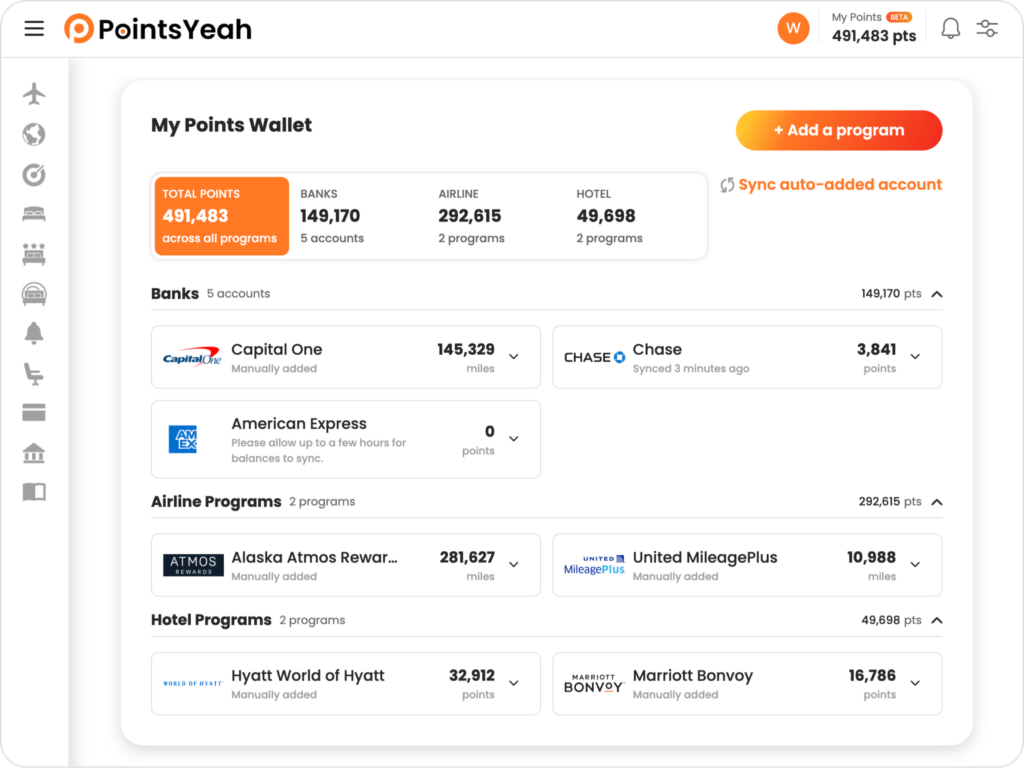
    PointsYeah’s My Wallet brings your rewards together in one place, making it easy to view balances, store loyalty account numbers, and keep everything organized before your next trip.

    Every PointsYeah account includes access to My Wallet. PointsYeah Premium unlocks Family and Friends Points Wallet, automatic syncing with select bank and airline programs, and additional features for organizing rewards across multiple travelers.

    What Is My Wallet?

    My Wallet is your central hub for managing rewards balances.

    Add your airline, hotel, and bank rewards accounts to view them in one place instead of signing in to each account individually. Depending on the program and your PointsYeah membership, you can either connect your account for automatic syncing or manually enter your balance.

    My Wallet also stores your loyalty account numbers, making them easy to find whenever you’re ready to book.

    POINTSYEAH

    Add Your Loyalty Programs

    Getting started only takes a few minutes.

    Open My Wallet and select Add a Program.

    From there, choose whether you’d like to add a:

    • Bank rewards program
    • Airline loyalty program
    • Hotel loyalty program

    PointsYeah Premium members can connect eligible bank and airline programs for automatic syncing. If syncing isn’t available, or you’re using a free account, you can manually enter your balance and update it whenever you’d like.

    Over time, your wallet becomes a single place to organize all of your travel rewards.

    POINTSYEAH

    Store Your Loyalty Account Numbers

    My Wallet does more than track balances.

    Each program can also store your loyalty account number, making it easy to reference or copy whenever you’re booking a flight or hotel.

    Instead of searching through emails or password managers, your account numbers are available directly from your wallet when you need them.

    Family and Friends Points Wallet

    Planning trips often means managing rewards across more than one traveler.

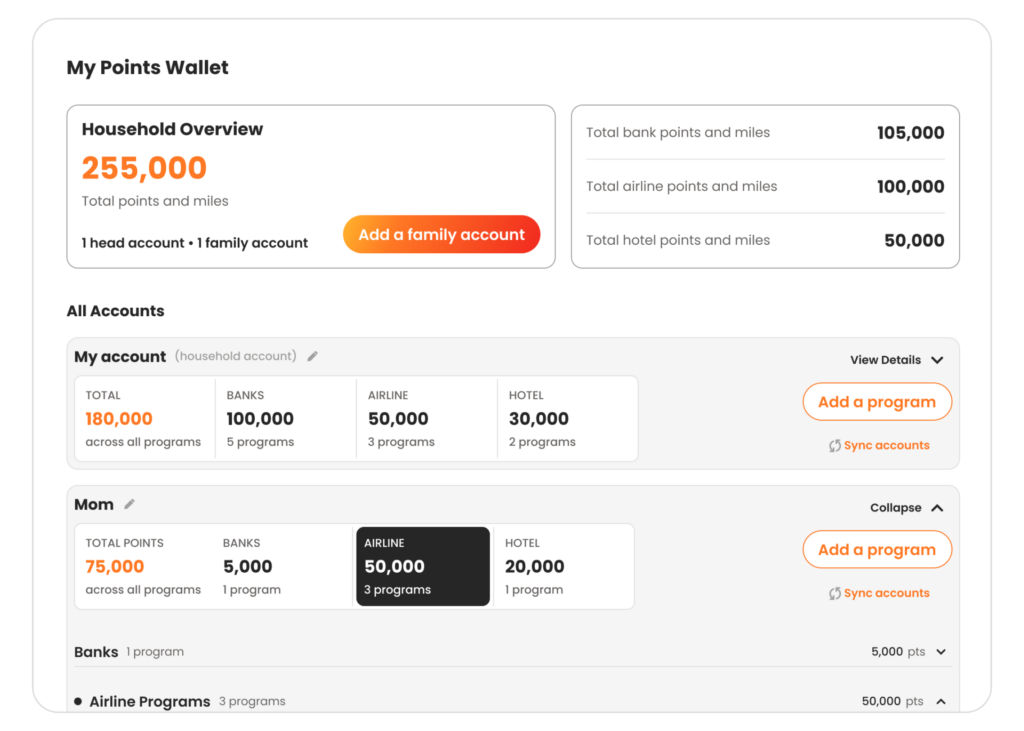
    With PointsYeah Premium, you can unlock Family and Friends Points Wallet, allowing you to organize rewards for up to five people in one place.

    In addition to your own Head Account, you can add up to four Family Accounts, each with their own airline, hotel, and bank rewards programs.

    Each account can:

    • Store loyalty account numbers.
    • Sync eligible bank and airline programs automatically.
    • Track manually entered balances for unsupported programs.

    At the top of your wallet, you’ll see a combined household rewards balance along with each person’s individual totals, making it easy to understand what rewards are available before planning a trip.

    You can also drag and drop Family Accounts to arrange them in the order that works best for you.

    POINTSYEAH

    Free vs. Premium

    Every PointsYeah account includes My Wallet, allowing you to organize your own loyalty programs in one place.

    Free members can:

    • Add airline, hotel, and bank rewards programs.
    • Store loyalty account numbers.
    • Track balances using manual updates.

    PointsYeah Premium expands My Wallet with:

    • Family and Friends Points Wallet.
    • Up to four additional Family or Friends Accounts.
    • Combined household rewards balances.
    • Automatic syncing with select bank and airline programs.
    • Additional tools for managing rewards across multiple travelers.
  • How to Search for Hotels with PointsYeah

    How to Search for Hotels with PointsYeah

    Finding the right hotel isn’t just about location. You also want to compare points rates, cash prices, loyalty programs, and booking options before making a reservation.

    PointsYeah brings that information together in one place, making it easy to search award hotels across supported loyalty programs and compare your options in seconds.

    Whether you’re planning a specific trip or simply comparing hotels in a destination, here’s how to get started.

    Before You Search

    For the best experience, sign in to your PointsYeah account before searching.

    A free account unlocks personalized search preferences, hotel alerts, and other features that make planning future trips easier.

    If you’re new to the platform, check out Getting Started with PointsYeah before running your first hotel search.

    Start a Hotel Search

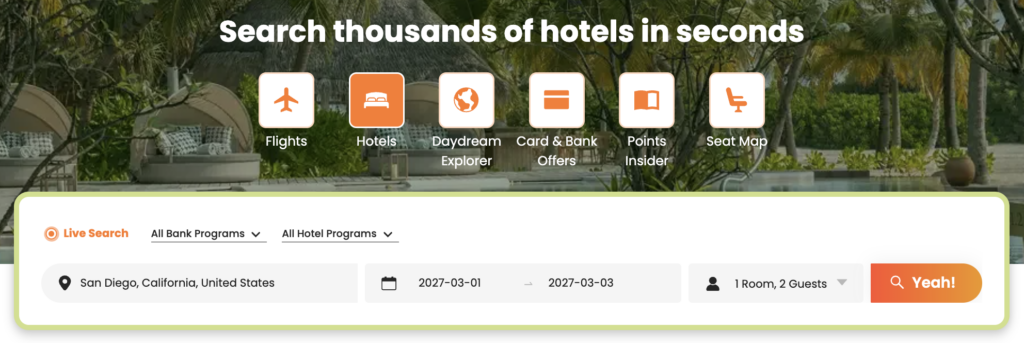
    From the Hotel Search page, enter your:

    • Destination
    • Check-in and check-out dates
    • Number of rooms and guests
    • Preferred bank or hotel loyalty programs (optional)

    Then select Yeah! to begin searching.

    POINTSYEAH

    Review Your Search Results

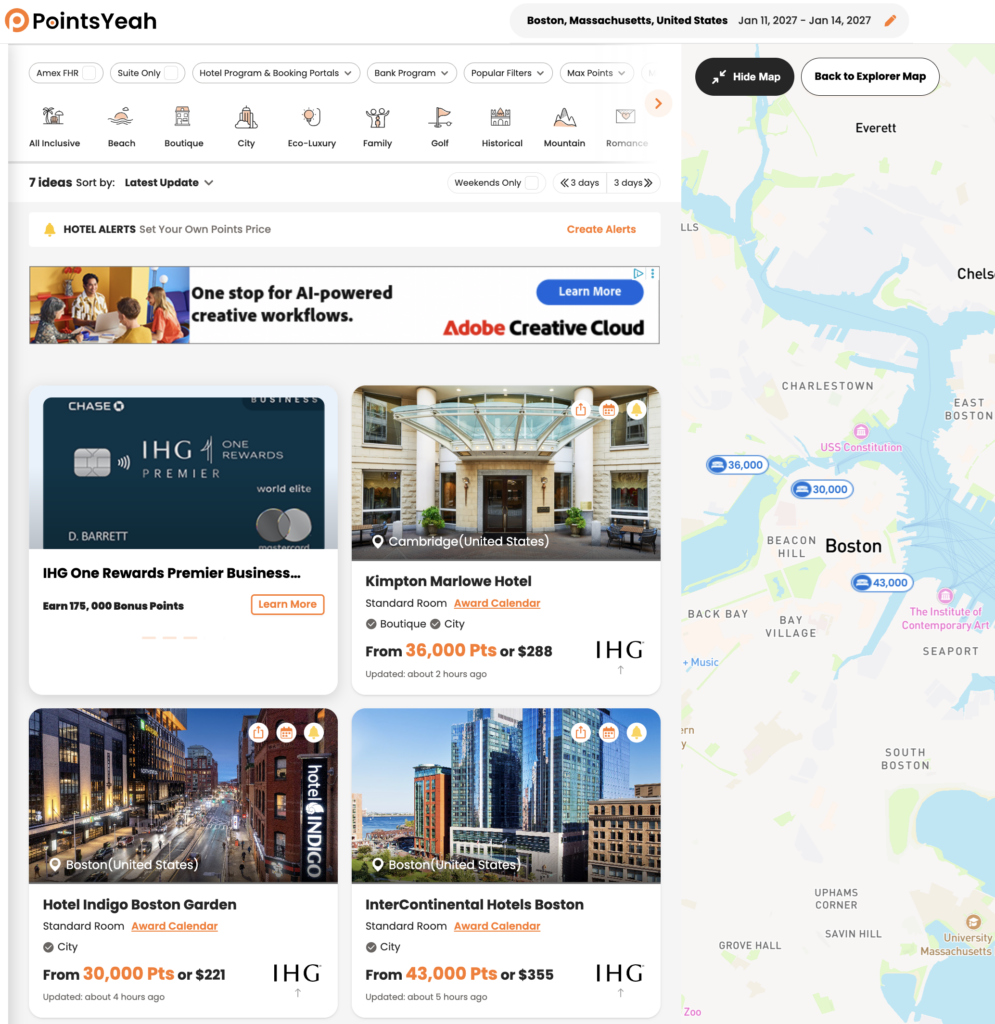
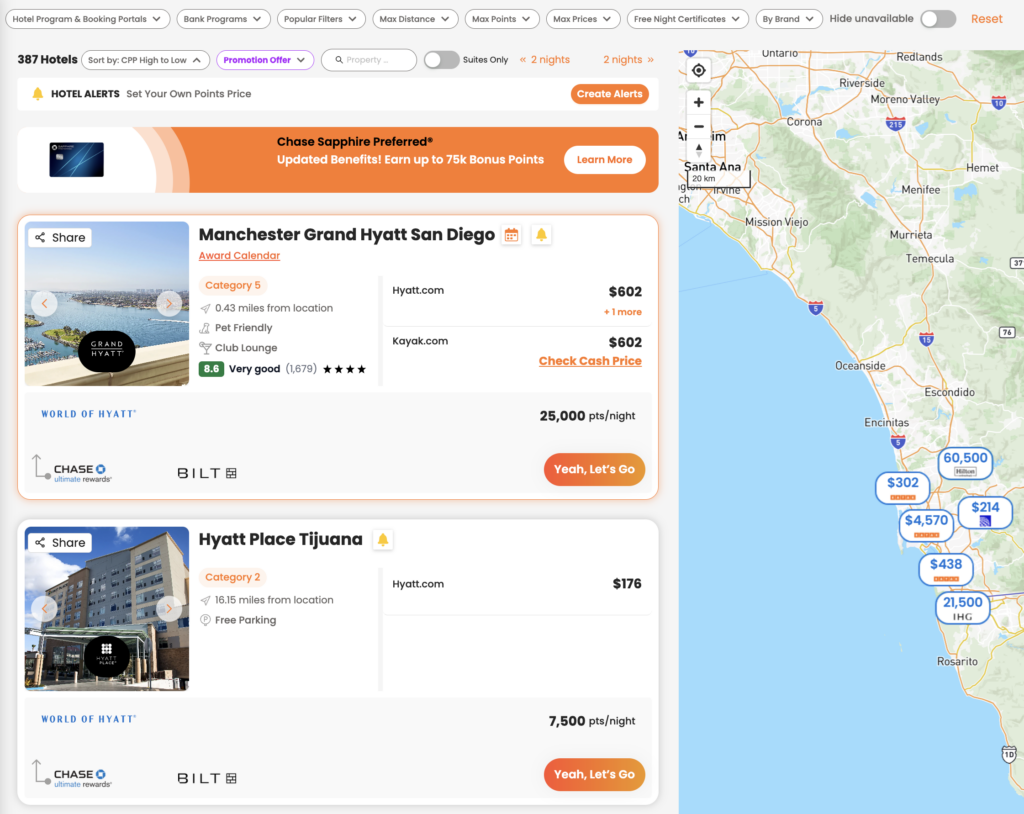
    PointsYeah searches supported hotel loyalty programs and displays available properties in a single list.

    Each result includes information to help you compare hotels, including:

    • Hotel name
    • Hotel loyalty program
    • Points required per night
    • Cash price
    • Hotel category (when available)
    • Distance from your search location
    • Amenities
    • Guest ratings
    • Eligible transfer partners

    If you’d rather browse visually, switch to the interactive map to compare hotels by location.

    POINTSYEAH

    Refine Your Search

    The filter bar lets you narrow your results without starting over.

    Available filters include:

    • Hotel loyalty programs
    • Bank programs
    • Maximum points
    • Maximum cash price
    • Maximum distance
    • Hotel brand
    • Free Night Certificates
    • Suites only
    • Popular filters
    • Hide unavailable hotels

    As you adjust filters, your results update automatically so you can quickly focus on the hotels that fit your trip.

    Search tip

    If your plans are flexible, try adjusting your travel dates or searching a slightly larger area. Hotel award pricing can vary significantly from one night to the next, even at the same property.

    You can also personalize your preferred loyalty programs and other search settings to simplify the search process.

    Compare Hotel Details

    Selecting a hotel opens a detailed view with everything you need before booking.

    Depending on the property, you’ll see:

    • Award price
    • Cash price
    • Hotel loyalty program
    • Eligible transfer partners
    • Hotel category (when available)
    • Amenities
    • Ratings and reviews

    Selecting Yeah, Let’s Go takes you directly to the hotel’s booking page for your selected dates so you can complete your reservation.

    Check the Award Calendar

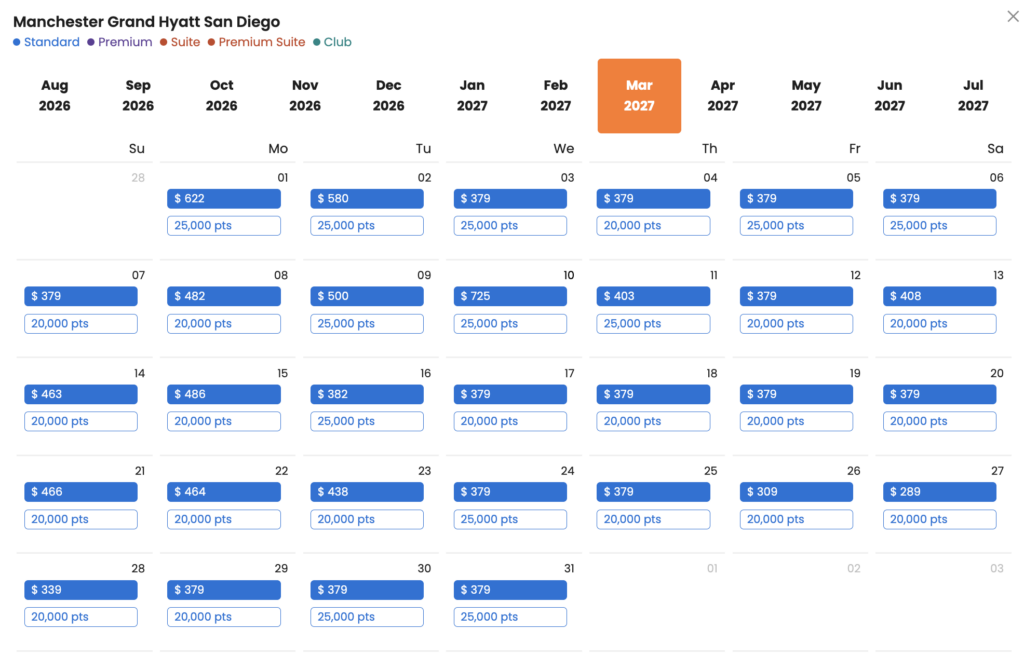
    Some hotels also show an Award Calendar.

    The Award Calendar lets you compare award pricing across multiple dates without running another search.

    For participating properties, you’ll see nightly points rates alongside cash prices, making it easier to identify lower-priced redemption dates if your schedule is flexible.

    Not every hotel offers an Award Calendar, but when available, it’s one of the fastest ways to compare award availability over time.

    POINTSYEAH

    Free vs. Premium

    Every PointsYeah account includes Hotel Search, with Premium adding additional tools for travelers who monitor hotel availability regularly.

    Free

    Free members can:

    • Search award hotels across supported loyalty programs.
    • Compare points and cash pricing.
    • Create up to 4 active Hotel Alerts.

    Premium

    PointsYeah Premium includes:

    • Up to 32 active Hotel Alerts.
    • Additional Premium search features across the platform.
    • Expanded tools for travelers planning multiple trips.

    If you frequently book hotels with points or monitor award availability before booking, Premium offers additional flexibility.

  • How to Search for Flights with PointsYeah

    How to Search for Flights with PointsYeah

    PointsYeah helps you search award flights across multiple airline loyalty programs in a single search, making it easier to compare redemption options without checking each airline individually.

    Whether you’re planning a specific trip or exploring flexible travel dates, this guide explains how to search for award flights, filter your results, and compare booking options.

    Before You Search

    For the best experience, sign in to your PointsYeah account before starting a search.

    A free account unlocks personalized search preferences, saved alerts, and other features that make planning future trips easier.

    If you’re new to the platform, start with Getting Started with PointsYeah to familiarize yourself with the basics.

    Start a Live Search

    From the Live Search page, enter your:

    • Departure airport
    • Arrival airport
    • Travel date
    • Number of travelers
    • Cabin
    • Preferred airline or bank programs (optional)

    Then select Yeah! to begin searching.

    PointsYeah homepage featuring live flight search widget.
    POINTSYEAH

    Review Your Search Results

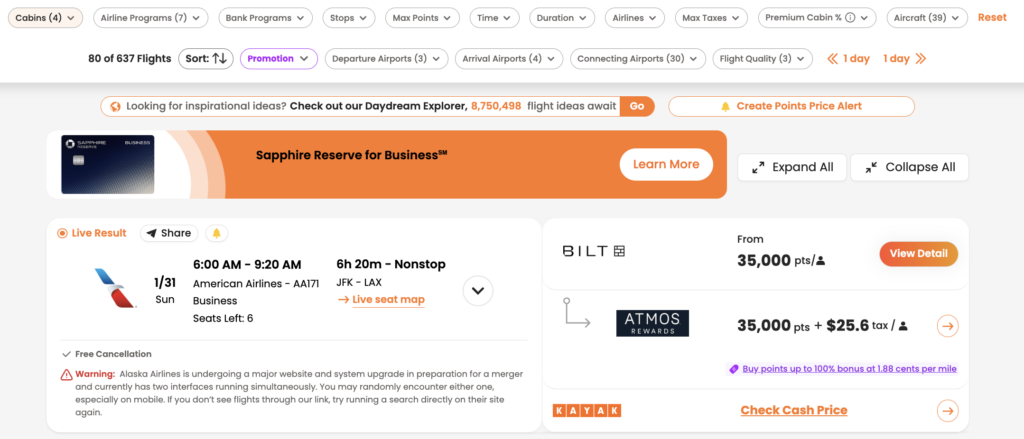
    PointsYeah searches supported airline loyalty programs and displays available award flights in a single list.

    Each result includes key information to help you compare your options, including:

    • Airline and operating carrier
    • Cabin
    • Points required
    • Taxes and fees
    • Flight duration
    • Stops
    • Loyalty program
    • Transfer partners (when applicable)

    At the top of the page, you’ll also find filters that let you quickly narrow your results.

    POINTSYEAH

    Refine Your Search

    The filter bar lets you narrow your results without starting a new search.

    Available filters include:

    • Cabin
    • Airline programs
    • Bank programs
    • Stops
    • Maximum points
    • Maximum taxes and fees
    • Airlines
    • Departure airports
    • Arrival airports
    • Connecting airports
    • Flight quality
    • Aircraft type
    • Departure time
    • Flight duration

    As you adjust filters, your results update automatically, making it easy to compare only the flights that match your preferences.

    Search Tip

    If your travel plans are flexible, try adding nearby airports or alternative destinations to your search. Award availability often varies between airports, even within the same region, and a small change in your itinerary may uncover additional redemption options.

    You can also personalize your default airports, preferred loyalty programs, and other search settings for a seamless experience.

    Compare Your Booking Options

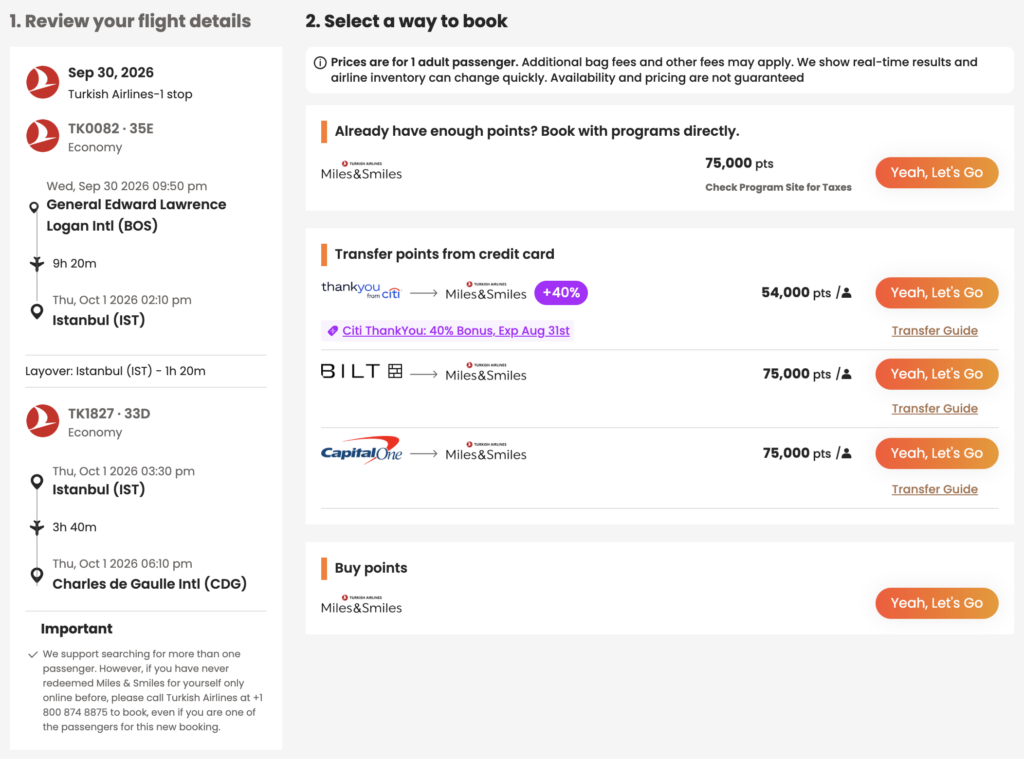
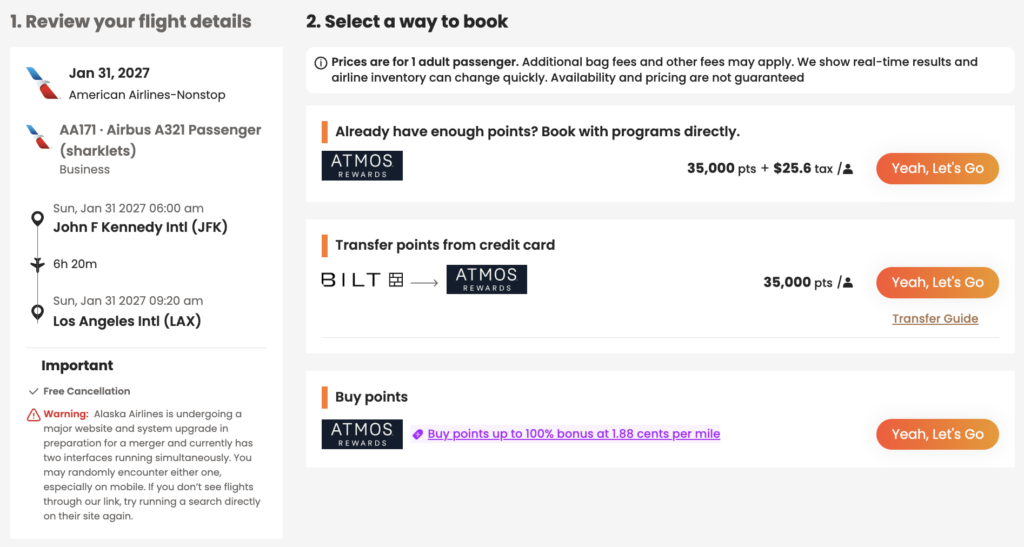
    Selecting a flight opens a detailed booking panel showing the different ways you may be able to book that itinerary.

    Depending on the flight, you may see options to:

    • Book directly with an airline loyalty program
    • Transfer points from an eligible bank rewards program
    • Purchase additional airline miles when available

    This view also displays important trip details, including taxes and fees, aircraft type, cancellation policies (when available), and transfer guidance where applicable.

    POINTSYEAH

    Free vs. Premium

    Every PointsYeah account includes access to Live Search, but Premium expands how much you can search in a single query.

    Free

    Free members can:

    • Search for one departure airport and one arrival airport.
    • Search across a 4-day travel window.
    • Create up to four active Points Price Alerts.

    Premium

    PointsYeah Premium adds additional flexibility for travelers comparing multiple airports or planning more complex trips.

    Premium members can:

    • Search up to three departure and three arrival airports.
    • Search across an 8-day travel window.
    • Compare more airport combinations in a single search.
    • Create up to 32 active Points Price Alerts.
    • Access additional Premium search features throughout the platform.

    If you regularly compare nearby airports or travel with flexible plans, Premium can help reduce the number of searches needed to find the right itinerary.