
PointsYeah helps you search award flights across multiple airline loyalty programs in a single search, making it easier to compare redemption options without checking each airline individually.
Whether you’re planning a specific trip or exploring flexible travel dates, this guide explains how to search for award flights, filter your results, and compare booking options.
Before You Search
For the best experience, sign in to your PointsYeah account before starting a search.
A free account unlocks personalized search preferences, saved alerts, and other features that make planning future trips easier.
If you’re new to the platform, start with Getting Started with PointsYeah to familiarize yourself with the basics.
Start a Live Search
From the Live Search page, enter your:
- Departure airport
- Arrival airport
- Travel date
- Number of travelers
- Cabin
- Preferred airline or bank programs (optional)
Then select Yeah! to begin searching.

Review Your Search Results
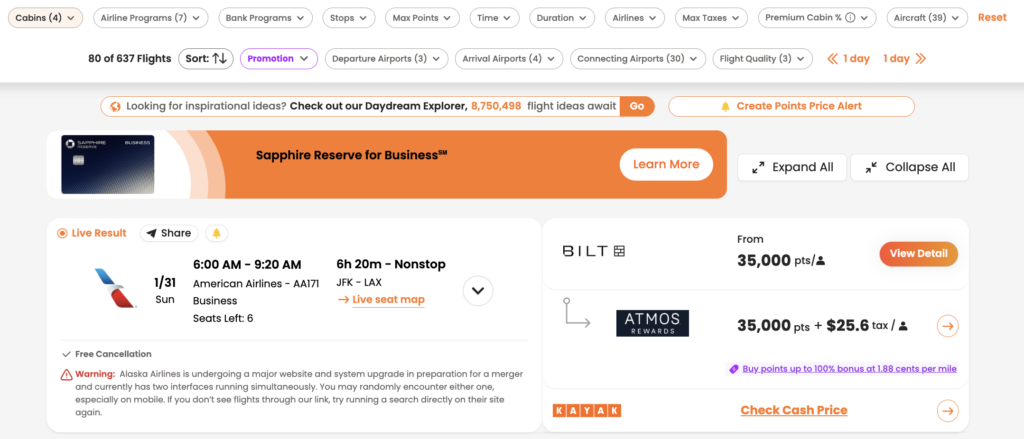
PointsYeah searches supported airline loyalty programs and displays available award flights in a single list.
Each result includes key information to help you compare your options, including:
- Airline and operating carrier
- Cabin
- Points required
- Taxes and fees
- Flight duration
- Stops
- Loyalty program
- Transfer partners (when applicable)
At the top of the page, you’ll also find filters that let you quickly narrow your results.
Refine Your Search
The filter bar lets you narrow your results without starting a new search.
Available filters include:
- Cabin
- Airline programs
- Bank programs
- Stops
- Maximum points
- Maximum taxes and fees
- Airlines
- Departure airports
- Arrival airports
- Connecting airports
- Flight quality
- Aircraft type
- Departure time
- Flight duration
As you adjust filters, your results update automatically, making it easy to compare only the flights that match your preferences.
Search Tip
If your travel plans are flexible, try adding nearby airports or alternative destinations to your search. Award availability often varies between airports, even within the same region, and a small change in your itinerary may uncover additional redemption options.
You can also personalize your default airports, preferred loyalty programs, and other search settings for a seamless experience.
Compare Your Booking Options
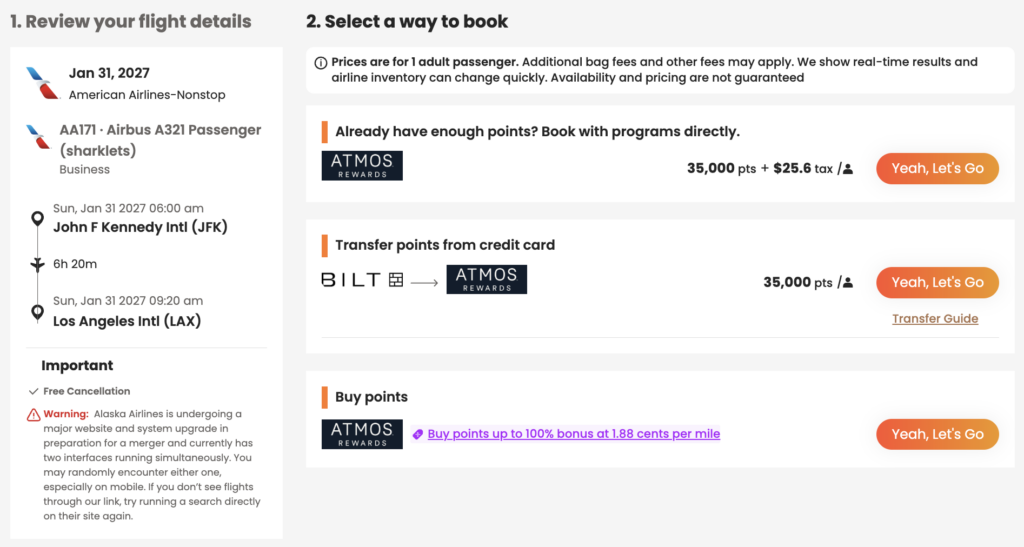
Selecting a flight opens a detailed booking panel showing the different ways you may be able to book that itinerary.
Depending on the flight, you may see options to:
- Book directly with an airline loyalty program
- Transfer points from an eligible bank rewards program
- Purchase additional airline miles when available
This view also displays important trip details, including taxes and fees, aircraft type, cancellation policies (when available), and transfer guidance where applicable.
Free vs. Premium
Every PointsYeah account includes access to Live Search, but Premium expands how much you can search in a single query.
Free
Free members can:
- Search for one departure airport and one arrival airport.
- Search across a 4-day travel window.
- Create up to four active Points Price Alerts.
Premium
PointsYeah Premium adds additional flexibility for travelers comparing multiple airports or planning more complex trips.
Premium members can:
- Search up to three departure and three arrival airports.
- Search across an 8-day travel window.
- Compare more airport combinations in a single search.
- Create up to 32 active Points Price Alerts.
- Access additional Premium search features throughout the platform.
If you regularly compare nearby airports or travel with flexible plans, Premium can help reduce the number of searches needed to find the right itinerary.
Leave a Reply