Category: PointsYeah Product

  • PointsYeah’s FHR Filter: The Easiest Way to Search Amex FHR Properties and Use Your Platinum $600 Credit

    PointsYeah’s FHR Filter: The Easiest Way to Search Amex FHR Properties and Use Your Platinum $600 Credit

    The Platinum Hotel Credit Just Got Easier to Use

    If you hold the either American Express® Platinum Card, you already know it’s packed with travel perks. One of the best and most overlooked is the $600 Hotel Credit, split into two $300 statement credits each year. It applies to prepaid stays booked through Fine Hotels + Resorts® (FHR) or The Hotel Collection via Amex Travel.

    It’s a great perk in theory, but in practice,finding the right hotels that fit your budget, destination, and travel style can be time-consuming, especially when most searches show ultra-luxury properties far above your $300 credit.

    That’s why we built the PointsYeah FHR Filter. It’s a new way to explore the entire Amex FHR network, now searchable, filterable, and viewable in both map and list formats. Whether you’re trying to find a one-night stay fully covered by your credit or a luxury resort that’s worth a little extra, the FHR Filter makes it easy to plan smarter.

    🔍 Explore FHR Hotels on PointsYeah →

    What Are Fine Hotels + Resorts® and The Hotel Collection?

    Fine Hotels + Resorts® (FHR) and The Hotel Collection (THC) are Amex’s two premium hotel programs for Platinum and Centurion Card Members. Together, they include more than 2,000 top-tier properties worldwide that provide exclusive perks automatically applied when you book prepaid stays through Amex Travel.

    Every FHR booking includes:

    • Daily breakfast for two
    • Guaranteed 4pm late checkout
    • Noon check-in when available
    • Room upgrades upon arrival (when available)
    • A $100 property experience credit, typically for dining or spa services
    • Earn hotel points and elite credit

    The Hotel Collection bookings include:

    • Up to a $100 property credit per stay (varies by hotel)
    • Room upgrades upon arrival when available
    • A minimum two-night stay requirement

    For many travelers, these perks can easily add $200–$400 of value to a single night, but only if you can find the right property to use them at. That’s where PointsYeah’s FHR Filter comes in. It gives you visibility across the full network, making it easy to see where your credit stretches the farthest.

    Why PointsYeah Built the FHR Filter?
    We created the FHR Filter because the Platinum Card’s best perks were often going unused. Travelers told us the same things over and over:

    “I never know which hotels qualify.”

    “I can’t tell which FHR stays are under $300.”

    “I just want to use my credit without overspending.”

    The FHR Filter solves all of that. It is a free tool that lets you see the entire FHR ecosystem at once, not just in a list buried inside Amex Travel. You can now explore globally, compare prices, and find hotels that align with your credit and comfort zone.

    It’s for every kind of traveler:

    • Weekend explorers who want one-night getaways covered entirely by the $300 credit.
    • Luxury seekers looking for aspirational stays worth a modest top-up.
    • Frequent flyers who want to plan multi-city trips around their credits.

    Before, planning around your hotel credit required patience. Now it’s simply a filter away.

    How the PointsYeah FHR Filter Works
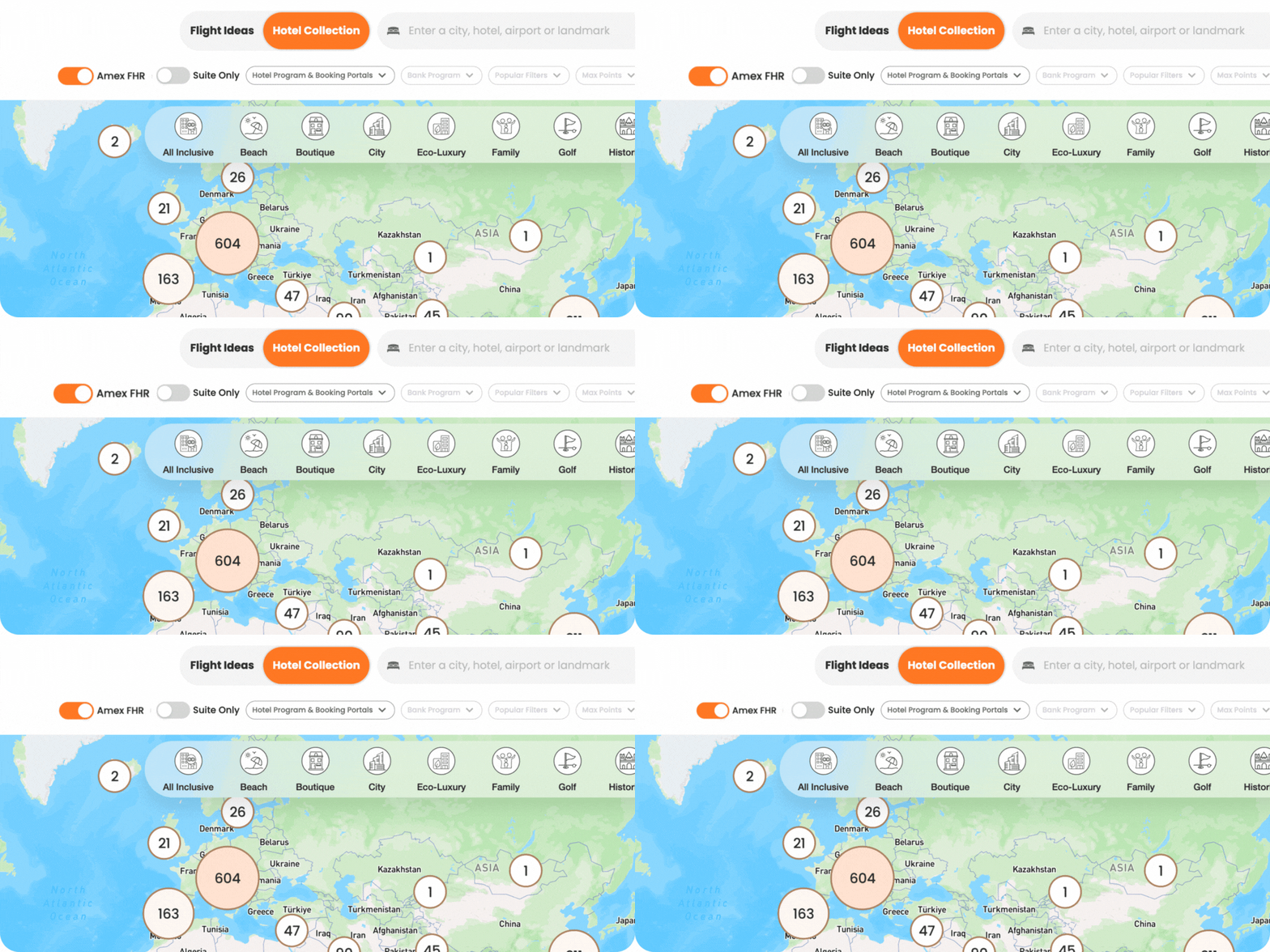
    Using the FHR Filter is simple but powerful. Here’s how it works:

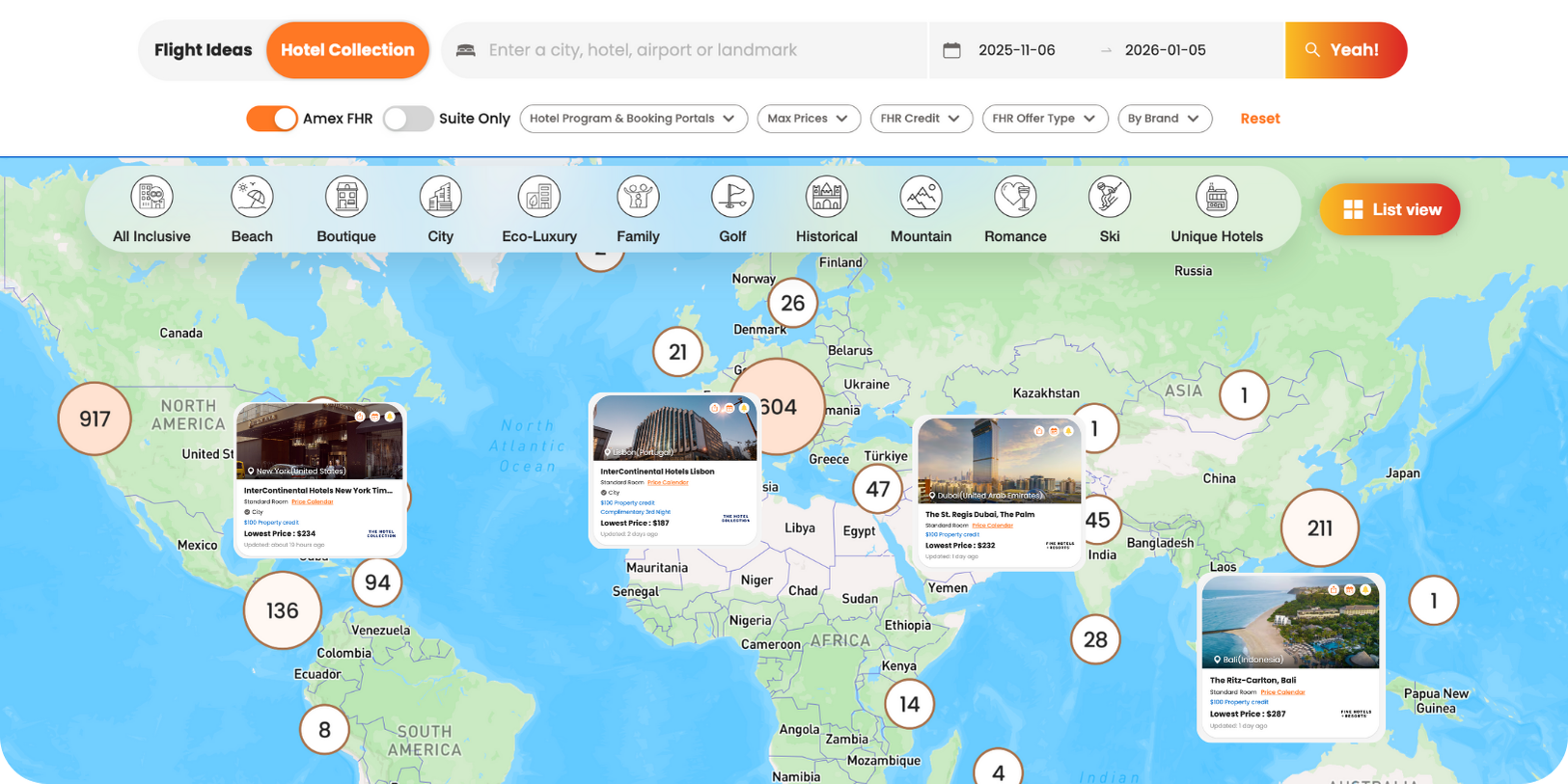
    1. Search any destination in the PointsYeah Hotel Collection.
    2. Turn on the “Fine Hotels + Resorts®” filter.
      • Instantly see verified Fine Hotels + Resorts® and The Hotel Collection properties across that city or region.
    3. Choose your view:
      • Map View: Browse visually to see where hotels are located and explore surrounding attractions.
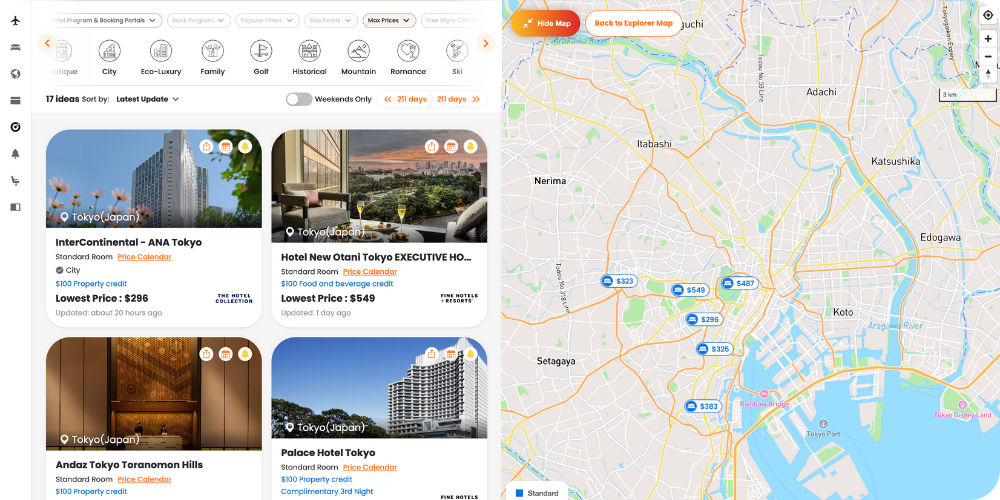
      • List View: Quickly compare prices, amenities, and brand details.
    4. Refine your results by adjusting dates, price range, or destination preferences.
    5. Use live pricing to find stays that make the most sense for your $300 semiannual credit.

    What makes this different is flexibility. You are no longer limited to a static portal. You can visualize, compare, and plan your trip all in one seamless interface.

    ✨ Try the FHR Filter Now →

    Finding Stays That Fit Your Credit and Your Budget

    Luxury doesn’t have to mean overspending. For many Platinum Card Members, the ideal stay is one that fits within the $300 semiannual hotel credit or just slightly above it, whether you’re booking through Fine Hotels + Resorts® or The Hotel Collection.

    Here’s how travelers are using it:

    • Fully covered stays: Filter for FHR properties under $300 per night. These are perfect for single-night getaways fully paid by your credit.
    • Sweet spot stays: Look in the $350–$450 range. Paying a small amount out of pocket can unlock much higher-end hotels.
    • Luxury upgrades: Combine both $300 credits for an extended stay or premium destination without blowing your budget.

    To put it in perspective, here are a few examples of high-value FHR stays often found near or below the $300 mark:
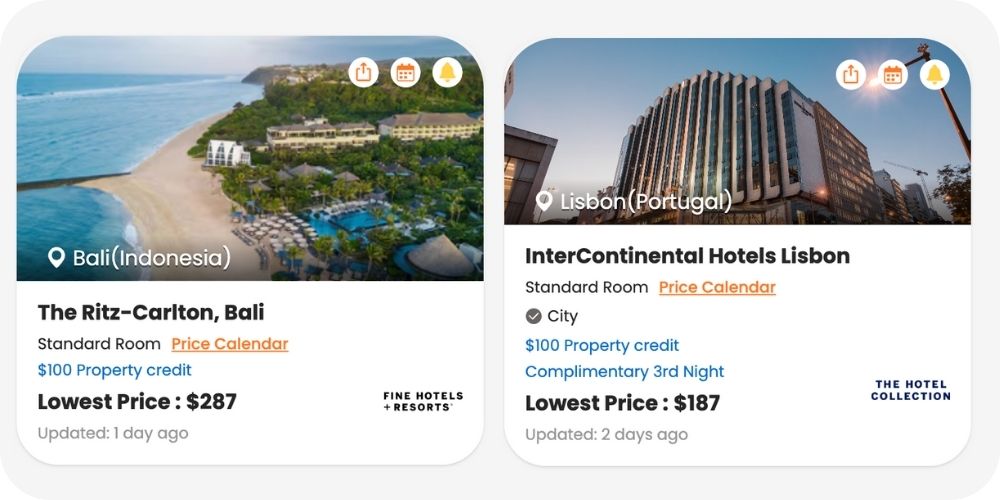
    • The Ritz-Carlton, Bali – from $290/night
    • InterContinental Lisbon – from $190/night
    • The St. Regis Dubai, The Palm – from $232/night
    • InterContinental New York Times Square – from $234/night
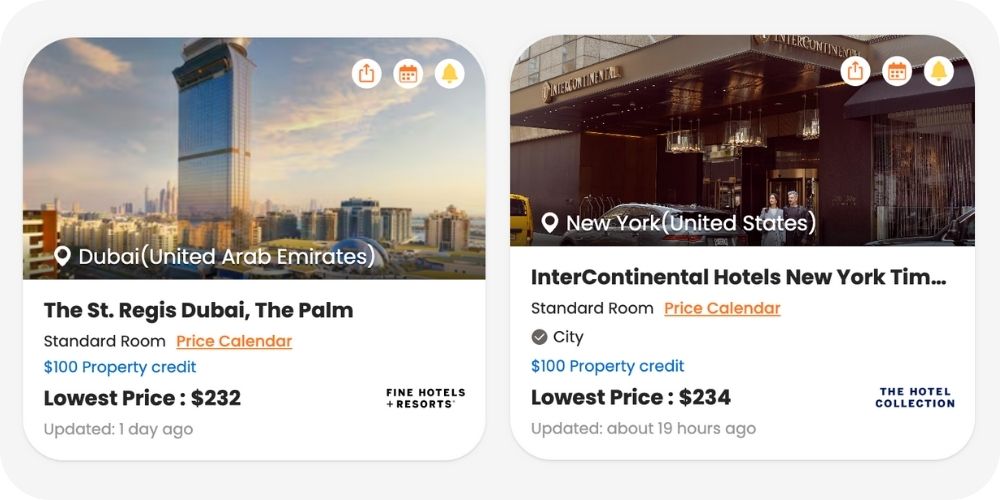
    Each property still includes the signature FHR perks such as breakfast, upgrades, and late checkout. Even a one-night stay feels like a complete getaway.

    The best part is that you don’t need to guess. The filter helps you spot these hidden gems instantly, saving time while helping you get more from your Platinum benefits.

    Why This Feature Matters for Platinum Card Members

    Before this, using the FHR benefit felt complicated, not because the program lacked value but because it lacked accessibility. The Amex Travel interface wasn’t designed for discovery. It worked if you already knew where you wanted to go, but not if you were trying to decide how to use your credit wisely.

    The PointsYeah FHR Filter changes that completely. It gives you the freedom to explore, experiment, and plan without committing to a booking. You can see the full picture first, then decide how to use your credit.

    Here’s why it matters:

    • Transparency: You can see what’s available, what it costs, and how far your credit goes.
    • Flexibility: Map or list view means you can browse in whatever way feels most natural.
    • Efficiency: Save hours of searching by focusing only on eligible hotels.
    • Inspiration: Discover destinations and FHR stays you may have never considered.

    This feature isn’t about promoting luxury. It’s about making it practical and usable for everyone who holds a Platinum Card.

    Explore the FHR Filter on PointsYeah →

    Final Thoughts

    The $600 Hotel Credit from the Amex Platinum Card is one of the most generous travel benefits available, but only if you actually use it.

    With PointsYeah’s FHR Filter, that becomes effortless. You can find properties that fit your plans and budget, visualize your options on a map, and make smart choices about where to redeem your credits.

    It’s not just a new search filter. It’s the missing link between knowing your benefits and actually using them.

    Whether you are planning a one-night getaway, a spontaneous weekend trip, or a bucket-list vacation, the FHR Filter helps you see what’s possible, instantly.

    Start Searching Fine Hotels + Resorts® on PointsYeah →

    Frequently Asked Questions

    What is the Fine Hotels + Resorts® program from Amex?

    Fine Hotels + Resorts® (FHR) is Amex’s luxury hotel network for Platinum and Centurion Card Members. It includes premium properties worldwide that offer benefits like daily breakfast, late checkout, room upgrades, and on-property credits when booked through Amex Travel.

    How can I find Fine Hotels + Resorts® properties online?

    You can explore all Fine Hotels + Resorts® properties using PointsYeah’s FHR Filter. It allows you to view verified FHR hotels in both map and list view, compare prices, and plan how to use your Platinum Card credits.

    Can I use PointsYeah to see which hotels fit my Amex Platinum credit?

    Yes. The FHR Filter shows real pricing for each property, so you can easily find hotels that fit within your $300 semiannual credit or your total $600 annual limit.

    What’s the best way to use the Amex Platinum hotel credit?

    Use your Platinum Card’s $600 hotel credit strategically by finding FHR stays under $300 per night. Many travelers use PointsYeah to find one-night getaways fully covered by the credit or short luxury stays that cost only a little more.

    Can I find Fine Hotels + Resorts® stays under $300 per night?

    Yes. Many FHR properties around the world are available for under $300 per night. The PointsYeah FHR Filter makes it easy to find and compare these options instantly.

    Do I need to log in or link my Amex account to use PointsYeah?

    No. Anyone can browse FHR properties on PointsYeah. Platinum and Centurion Card Members simply need to book through Amex Travel to receive the benefits and statement credits.

    Are the Fine Hotels + Resorts® listings on PointsYeah updated regularly?

    Yes. FHR properties are verified and refreshed often to ensure the listings and pricing reflect the latest availability.

    Does the PointsYeah filter include The Hotel Collection too?

    Yes. The filter includes both Fine Hotels + Resorts® and The Hotel Collection properties. You can view them together in map or list view when you toggle on the “FHR” filter.

    Can I book Fine Hotels + Resorts® stays directly through PointsYeah?

    No. PointsYeah helps you research and compare properties quickly. You’ll still book through Amex Travel to receive the official Platinum benefits and credits.

  • Introducing Travel Radar: Your 365-Day Award Travel Calendar

    Introducing Travel Radar: Your 365-Day Award Travel Calendar

    Award space changes fast. Seats open, disappear, and shift every single day. For years, travelers had to re-run the same searches or juggle multiple alerts to avoid missing out.

    That changes today.

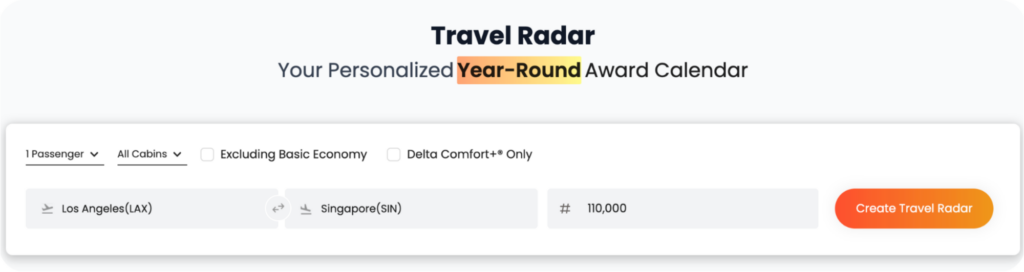
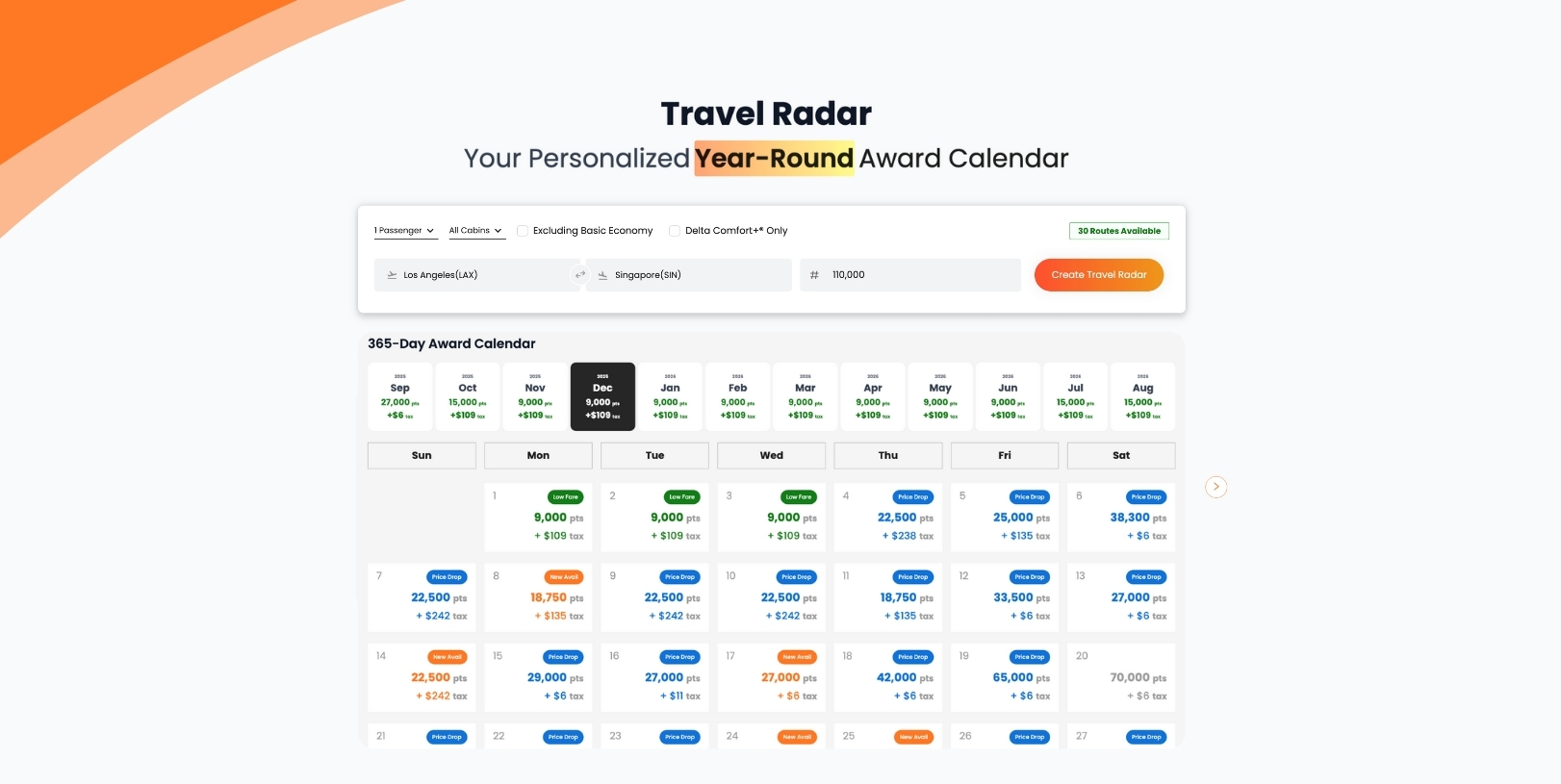
    Travel Radar is here. A Premium-exclusive feature that monitors your most important routes 365 days a year, refreshes results daily, and shows you the best opportunities in a simple calendar view.

    No guesswork. No endless refreshing. Just clarity.

    A Better Way to View Award Space

    Award space is always moving. Some days the lowest prices appear far in advance, while on other routes the best seats open closer to departure. Flexibility is key, and the real advantage comes from being able to see the bigger picture.

    Many PointsYeah members already monitor the same route with multiple alerts or repeat searches throughout the year. That insight inspired us to build a tool that puts everything into one clear, year-long view.

    Travel Radar gives you that perspective. Whether you want the lowest points price, newly released premium seats, or peace of mind for family travel, it brings all the opportunities together in a single calendar refreshed daily.

    What Travel Radar Does

    Travel Radar gives you the year-long view that was missing. Instead of tracking a handful of days, it monitors your chosen routes for a full 365 days. Results refresh daily and highlight the opportunities that matter most.

    Think of it as your personal award travel command center.

    • Track up to 4 routes for a full year
    • Daily refreshes keep availability and pricing current
    • Clean calendar view highlights the lowest points days
    • Smart filters narrow results by cabin, stops, airlines, and more
    • At-a-glance insights show new availability and recent price drops

    👉 The result: A year’s worth of award data delivered in one place, updated every day.

    How Travel Radar Works

    Setting up a Radar is simple. The real power comes after.

    1. Choose your route

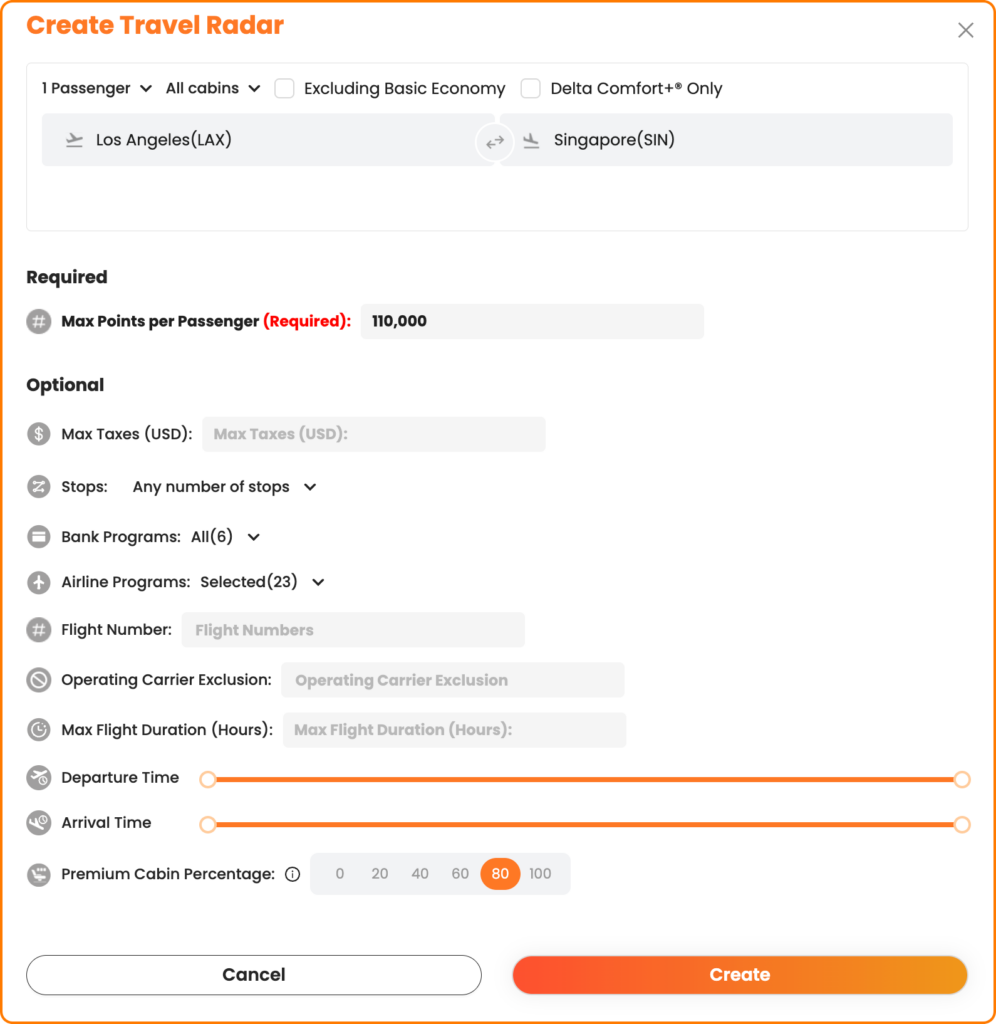
    Select your origin and destination, passenger count, preferred cabin, and max points per passenger. Want to skip basic economy? Exclude it with one click.

    1. Fine-tune with filters

    Dial in the details with advanced options:

    • Focus on specific airline or bank transfer programs
    • Require a minimum percentage of premium cabin space
    • Limit connections or exclude airlines you do not want to fly

    Once saved, your Radar begins scanning right away.

    1. Watch your calendar fill in

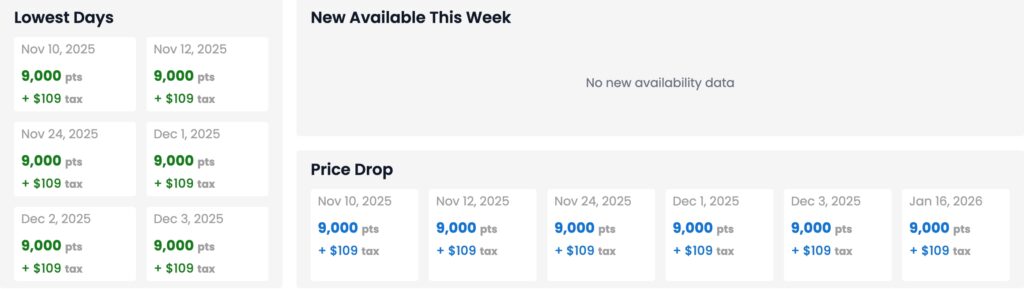
    Travel Radar builds a full-year view that refreshes daily. Soon, you will see:

    • Lowest points days across the year
    • Newly added award space since the last refresh
    • Price drops worth your attention

    Browse month by month or jump directly to the season you care about most. If you selected multiple cabins when creating your Radar, you can filter the calendar view to focus on the exact cabin you want.

    1. Dive into details

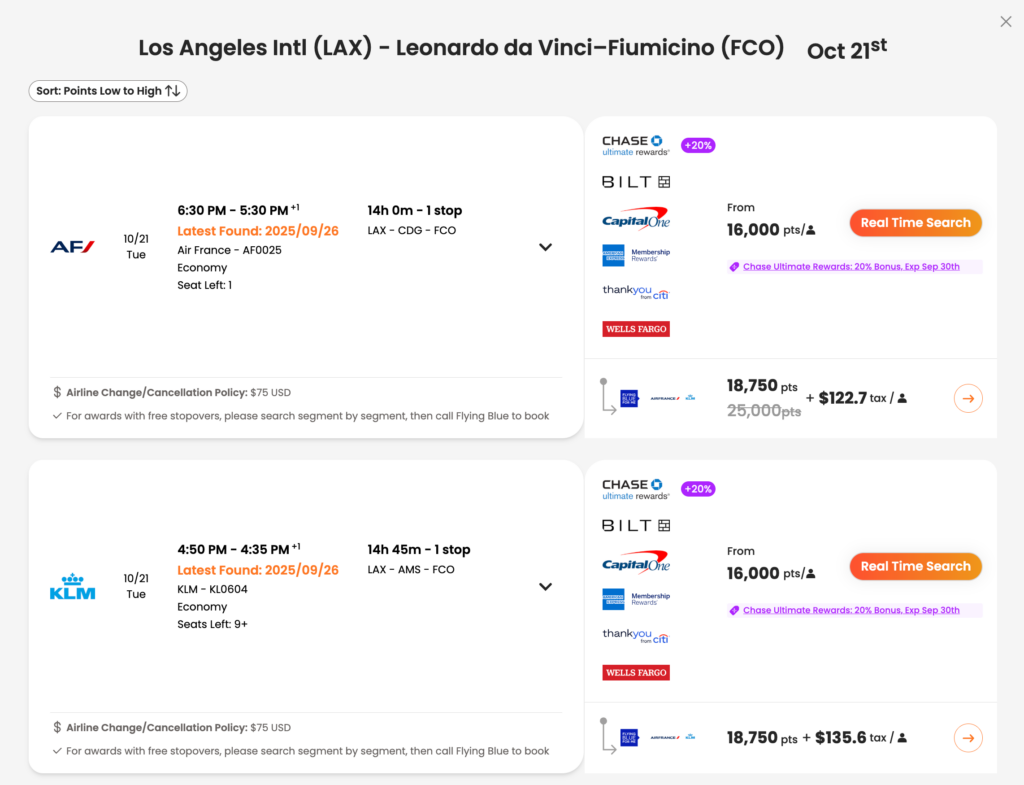
    Click on any day to view flight options, transfer partners, and pricing breakdowns. Found something that works? Launch a Real Time Search to confirm live availability before booking.

    Travel Radar vs. Points Price Alerts

    Both tools are powerful. Together, they are unbeatable.

    • Points Price Alerts: Best for precision. Each alert monitors a specific window of up to 8 days and notifies you when availability or pricing changes. Free users can set 4 alerts. Premium members can set 32.
    • Travel Radar: Best for the big picture. Tracks entire routes for a year, refreshing daily and showing you availability in a single calendar view. Premium exclusive.

    When Travel Radar Makes the Difference

    Some trips are too important to leave to chance. Travel Radar was built for them:

    • Milestone journeys
      • Monitor honeymoons, anniversaries, or bucket-list adventures without missing newly released space.
    • Holiday travel home
      • Avoid the stress of last-minute searches. Track your route all year and secure award seats before peak demand wipes them out.
    • Annual vacations
      • Whether it is summer in Europe or a winter beach escape, let Travel Radar reveal the weeks when flights cost fewer points.
    • Frequent business routes
      • Keep your city pairs covered every single day, so you can plan trips with confidence.

    Premium vs. Free: What You Get

    Not sure if Premium is worth it? Here is how it compares.

    FeatureFreePremium
    Travel RadarTrack 4 routes for 365 days (Premium exclusive)
    Points Price AlertsUp to 4Up to 32
    Hotel AlertsUp to 4Up to 15
    Number of search days (one-way)Up to 4Up to 8
    Multi-Airport Search
    United Airlines upgrade alerts
    Custom value per point

    👉 With Premium, you are not just unlocking Travel Radar. You are getting the most complete toolkit in award travel.

    Start Using Travel Radar

    Travel Radar is live today, included with Premium. Set up your first Radar in under a minute and get a complete year’s view of your most important routes.

    👉 Upgrade to Premium and unlock Travel Radar now

    Frequently Asked Questions

    How many Radars can I create?

    Up to 4 at a time with Premium.

    Do they refresh automatically?

    Yes. Each Radar refreshes daily, so you are always seeing the latest availability.

    Do Points Price Alerts expire?

    No. Alerts run until you turn them off. They cover up to 8 days, while Travel Radar covers a full 365.

    Can I adjust my filters later?

    Absolutely. Edit your Radar anytime, and your results update on the next refresh.

    Can I delete a Radar and create a new one?

    Yes. You can remove an old Radar and replace it with a new route whenever you like.

    What if I want to track a trip more than a year away?

    Travel Radar covers 365 days from the day you create it. For future trips beyond that, simply set a new Radar when your window opens.

    How do Travel Radar and Real Time Search work together?

    Travel Radar shows you the big picture. When you find a day that looks right, Real Time Search confirms live availability so you can book with confidence.

  • Seat Alerts: Lock In the Seats You Actually Want

    Seat Alerts: Lock In the Seats You Actually Want

    When you book a flight, you focus on getting the deal: the miles, cash price, routing, or program. But once it’s booked, the seat itself can still make or break your trip.

    Even after you’ve locked in your flight, getting the seat you want isn’t always guaranteed.

    Airlines constantly shuffle seat availability behind the scenes. Aisles free up. Exit rows open. Blocked or preferred seats get released. Families change assignments as their plans shift. If you’ve ever refreshed the seat map again and again, hoping your ideal seat appears, you know how tedious it can be.

    That’s exactly why we built Seat Alerts.

    With Seat Alerts, you set your preferences once, and we’ll monitor the seat map for you. Whether you booked with points or paid cash, we keep watching in the background and notify you when your preferred seat becomes available. No more daily checks. No more missed windows.

    Real Situations Where Seat Alerts Make a Difference

    Even when your flight is booked, the seat map often isn’t fully settled. Airlines are constantly shifting inventory behind the scenes, and that creates opportunities if you’re paying attention.

    Seat Alerts are built for moments like these:

    • You booked, but only middle seats were available at the time.
    • Your family or group is split across multiple rows and you want to move together.
    • Exit rows, bulkheads, and extra legroom seats that are held back may open closer to departure.
    • Schedule changes or equipment swaps can free up better rows.
    • Airlines release blocked or elite-only seats as the flight date gets closer.
    • You’re trying to move farther from lavatories, galleys, or the very back of the plane.

    Instead of checking the seat map every day, Seat Alerts monitor these changes for you and send an alert as soon as your preferred seat opens up.

    Works for Cash or Award Tickets

    Seat Alerts track the seat map itself, not how you paid for the ticket. Whether you booked an award flight, paid cash, or used a credit card portal, you can set Seat Alerts on any eligible flight. We monitor the seat map directly and let you know when the seat you want becomes available.

    Simple to Set Up

    You can create a Seat Alert in two ways:

    Option 1: While searching

    • Run a live search and select the flight you’re interested in.
    • Open the seat map.
    • Click “Create Seat Alert.”
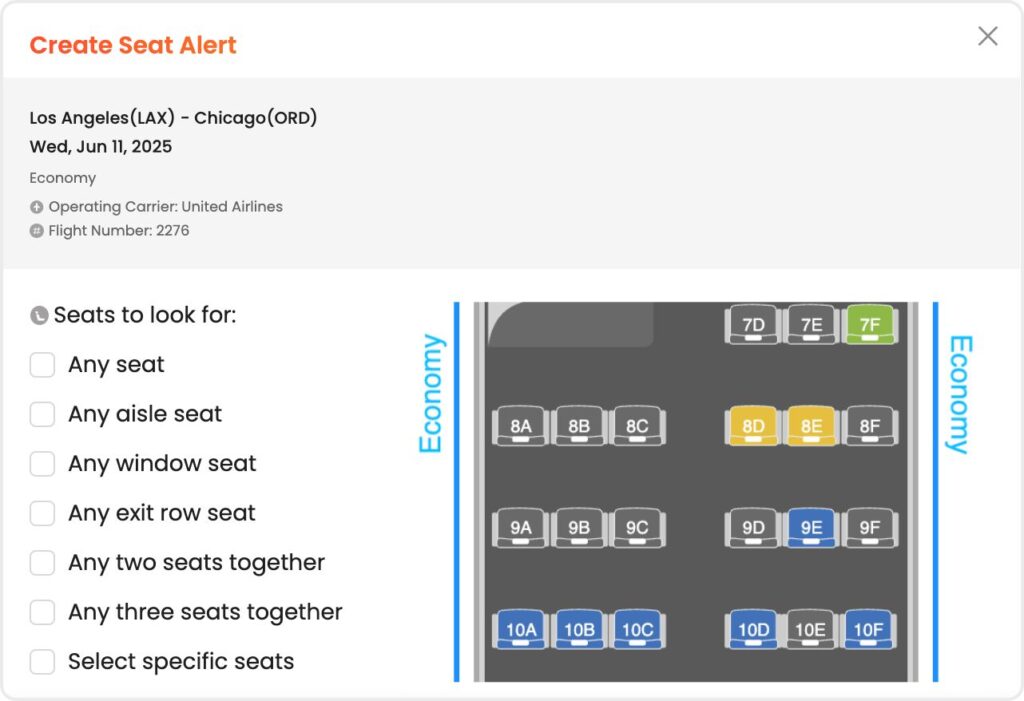
    • Select your seat preferences:
      • Any seat
      • Any aisle seat
      • Any window seat
      • Exit rows
      • Two or three seats together
      • Select specific seats manually
    • Once active, we’ll monitor the flight and notify you if your seat opens up.

    Option 2: From your account settings

    Submit your alert and we’ll handle the monitoring in the background.

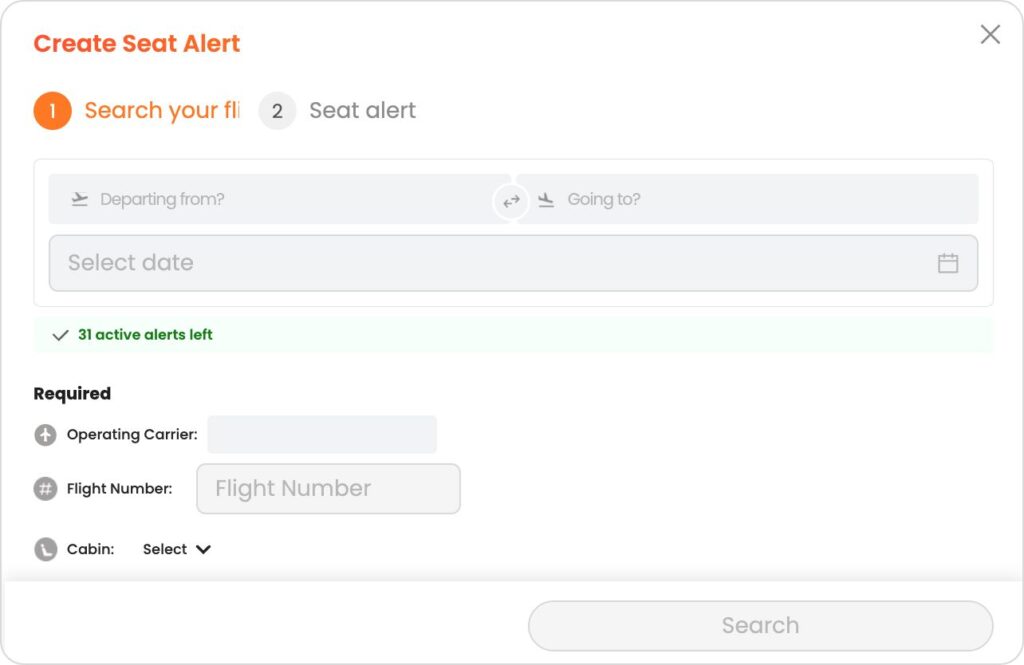
    • Go to Manage Seat Alerts.
    • Click “Create Seat Alert.”
    • Enter your flight details:
      • Departing from
      • Going to
      • Operating carrier
      • Flight number
      • Cabin
      • Your seat preferences
    • Submit your alert and we’ll handle the monitoring in the background.

    Free and Premium Options

    • Free members can set up to 4 active Seat Alerts.
    • Premium members can set up to 32 active Seat Alerts.

    Seat Alerts are live and available for all users while we continue to refine and expand the feature. As we gather feedback, we’ll keep improving coverage and monitoring behind the scenes.

    Seat Alerts are one more way PointsYeah helps take the hassle out of award travel. Combined with tools like live searches, Daydream Explorer, Points Price Alerts, and Hotel Alerts, you’re always one step ahead when it comes to booking smarter and traveling better.

    See you in the skies!

  • PointsYeah Starter Guide

    PointsYeah Starter Guide

    Welcome to PointsYeah!

    We believe traveling with points or miles should be simple. Whether you’re a seasoned pro or just getting started, our tools are designed to make booking award travel as smooth as possible.


    To get started, make sure you’re signed in.

    Creating a free account unlocks the full power of PointsYeah—and more features than any other award search tool:

    • Unlimited live searches (up to 4 days at a time for flights, any date range for hotels)
    • 4 Flight Price Point Alerts, 4 Hotel Alerts, and unlimited Explorer Alerts
    • Custom filters and settings to personalize your results
    • … and more!

    Once you’re signed in, explore the platform using the left sidebar and top header to navigate through our products.


    Want to learn more about our tools?

    Check out the full guides for each section of the site:

    Sunrise from a villa in Ubud, Bali

    That’s it! Thank you from all of us at PointsYeah for joining our site and becoming part of a global community of travelers. We all believe travel planning should be easy, and we’re building a product that makes that happen—one search or daydream at a time.

    Have questions or feature requests? Shoot us a message at yeah@pointsyeah.com, we’d love to hear from you!