Tag: Guide

Evergreen, instructional resource

  • How to Search Amex Fine Hotels + Resorts with PointsYeah

    How to Search Amex Fine Hotels + Resorts with PointsYeah

    The Platinum Hotel Credit Just Got Easier to Use

    If you hold the either American Express® Platinum Card, you already know it’s packed with travel perks. One of the best and most overlooked is the $600 Hotel Credit, split into two $300 statement credits each year. It applies to prepaid stays booked through Fine Hotels + Resorts® (FHR) or The Hotel Collection via Amex Travel.

    It’s a great perk in theory, but in practice,finding the right hotels that fit your budget, destination, and travel style can be time-consuming, especially when most searches show ultra-luxury properties far above your $300 credit.

    That’s why we built the PointsYeah FHR Filter. It’s a new way to explore the entire Amex FHR network, now searchable, filterable, and viewable in both map and list formats. Whether you’re trying to find a one-night stay fully covered by your credit or a luxury resort that’s worth a little extra, the FHR Filter makes it easy to plan smarter.

    🔍 Explore FHR Hotels on PointsYeah →

    What Are Fine Hotels + Resorts® and The Hotel Collection?

    Fine Hotels + Resorts® (FHR) and The Hotel Collection (THC) are Amex’s two premium hotel programs for Platinum and Centurion Card Members. Together, they include more than 2,000 top-tier properties worldwide that provide exclusive perks automatically applied when you book prepaid stays through Amex Travel.

    Every FHR booking includes:

    • Daily breakfast for two
    • Guaranteed 4pm late checkout
    • Noon check-in when available
    • Room upgrades upon arrival (when available)
    • A $100 property experience credit, typically for dining or spa services
    • Earn hotel points and elite credit

    The Hotel Collection bookings include:

    • Up to a $100 property credit per stay (varies by hotel)
    • Room upgrades upon arrival when available
    • A minimum two-night stay requirement

    For many travelers, these perks can easily add $200–$400 of value to a single night, but only if you can find the right property to use them at. That’s where PointsYeah’s FHR Filter comes in. It gives you visibility across the full network, making it easy to see where your credit stretches the farthest.

    Why PointsYeah Built the FHR Filter?
    We created the FHR Filter because the Platinum Card’s best perks were often going unused. Travelers told us the same things over and over:

    “I never know which hotels qualify.”

    “I can’t tell which FHR stays are under $300.”

    “I just want to use my credit without overspending.”

    The FHR Filter solves all of that. It is a free tool that lets you see the entire FHR ecosystem at once, not just in a list buried inside Amex Travel. You can now explore globally, compare prices, and find hotels that align with your credit and comfort zone.

    It’s for every kind of traveler:

    • Weekend explorers who want one-night getaways covered entirely by the $300 credit.
    • Luxury seekers looking for aspirational stays worth a modest top-up.
    • Frequent flyers who want to plan multi-city trips around their credits.

    Before, planning around your hotel credit required patience. Now it’s simply a filter away.

    How the PointsYeah FHR Filter Works
    Using the FHR Filter is simple but powerful. Here’s how it works:

    1. Search any destination in the PointsYeah Hotel Collection.
    2. Turn on the “Fine Hotels + Resorts®” filter.
      • Instantly see verified Fine Hotels + Resorts® and The Hotel Collection properties across that city or region.
    3. Choose your view:
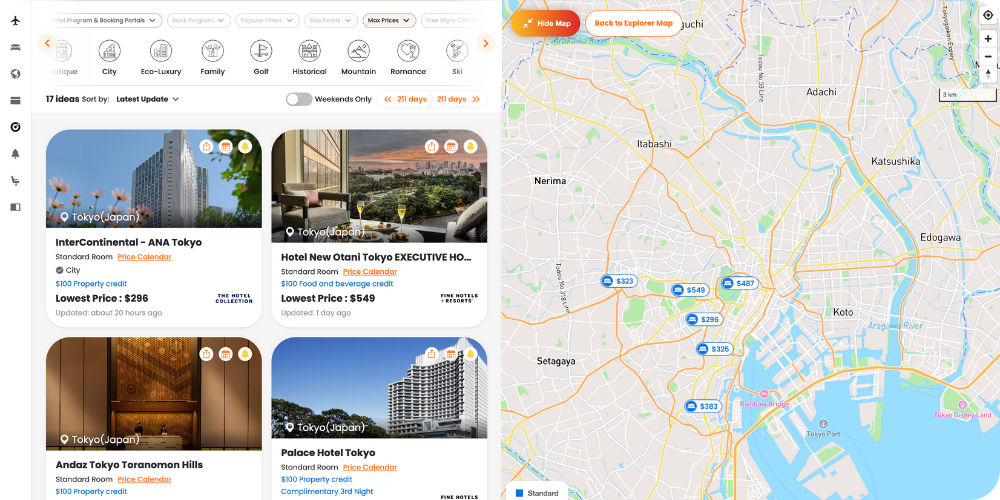
      • Map View: Browse visually to see where hotels are located and explore surrounding attractions.
      • List View: Quickly compare prices, amenities, and brand details.
    4. Refine your results by adjusting dates, price range, or destination preferences.
    5. Use live pricing to find stays that make the most sense for your $300 semiannual credit.

    What makes this different is flexibility. You are no longer limited to a static portal. You can visualize, compare, and plan your trip all in one seamless interface.

    ✨ Try the FHR Filter Now →

    Finding Stays That Fit Your Credit and Your Budget

    Luxury doesn’t have to mean overspending. For many Platinum Card Members, the ideal stay is one that fits within the $300 semiannual hotel credit or just slightly above it, whether you’re booking through Fine Hotels + Resorts® or The Hotel Collection.

    Here’s how travelers are using it:

    • Fully covered stays: Filter for FHR properties under $300 per night. These are perfect for single-night getaways fully paid by your credit.
    • Sweet spot stays: Look in the $350–$450 range. Paying a small amount out of pocket can unlock much higher-end hotels.
    • Luxury upgrades: Combine both $300 credits for an extended stay or premium destination without blowing your budget.

    To put it in perspective, here are a few examples of high-value FHR stays often found near or below the $300 mark:
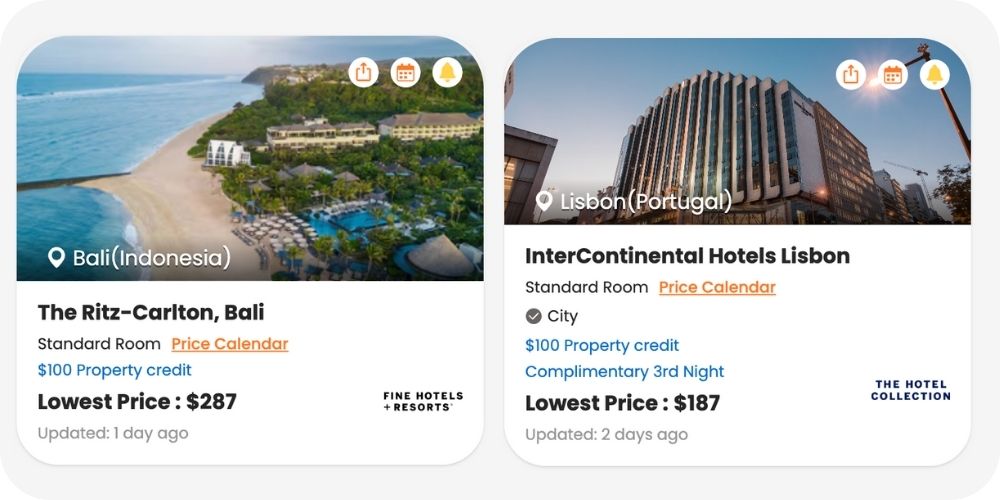
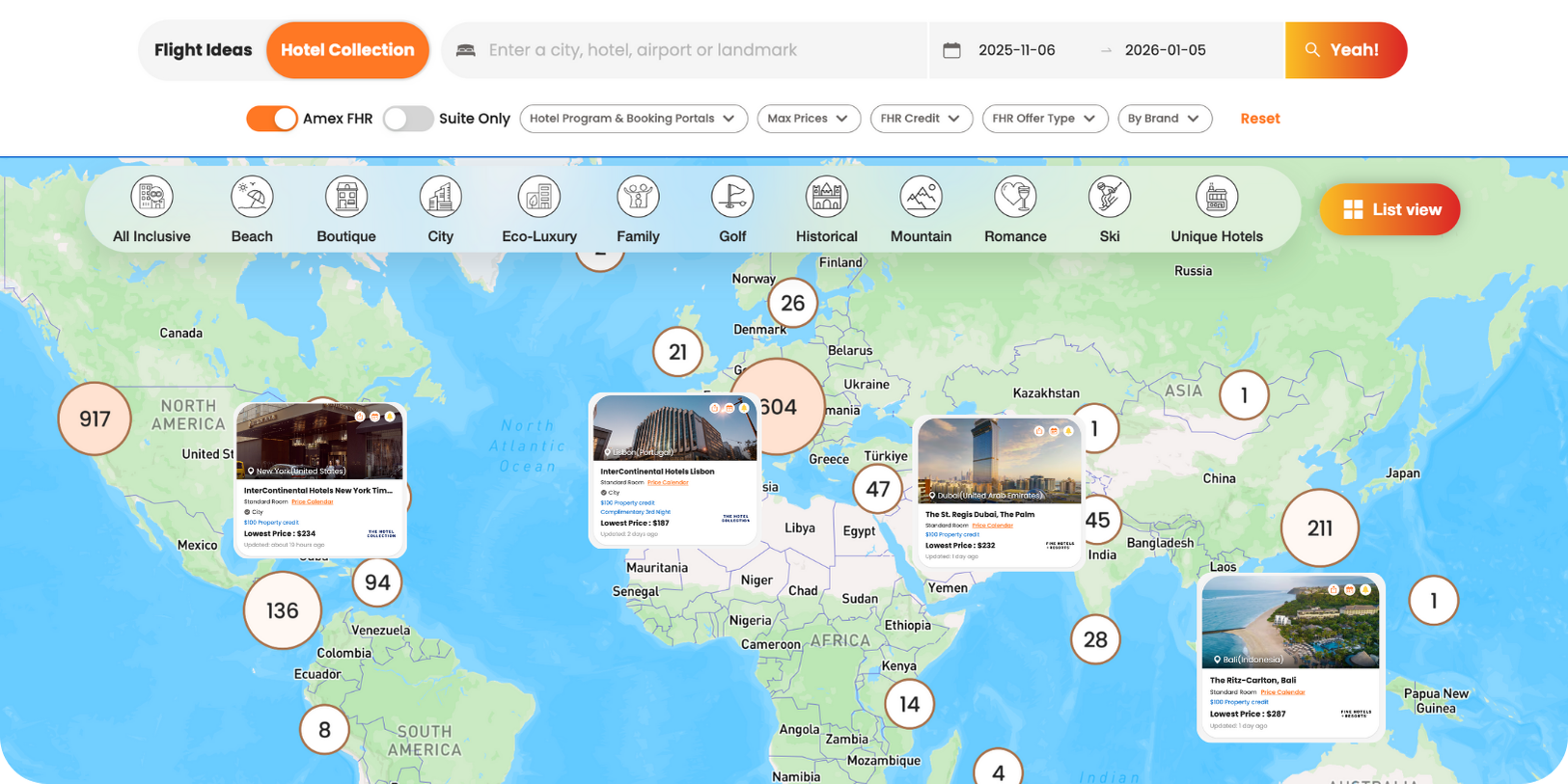
    • The Ritz-Carlton, Bali – from $290/night
    • InterContinental Lisbon – from $190/night
    • The St. Regis Dubai, The Palm – from $232/night
    • InterContinental New York Times Square – from $234/night
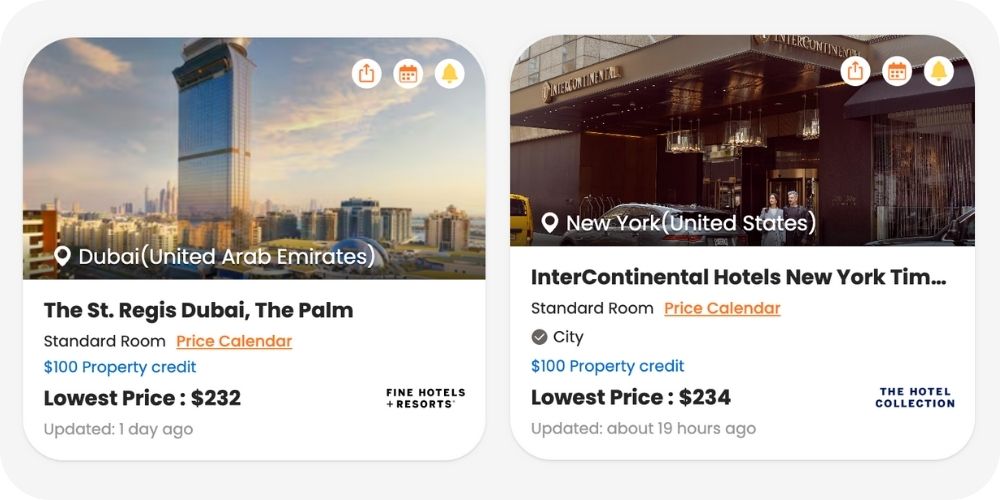
    Each property still includes the signature FHR perks such as breakfast, upgrades, and late checkout. Even a one-night stay feels like a complete getaway.

    The best part is that you don’t need to guess. The filter helps you spot these hidden gems instantly, saving time while helping you get more from your Platinum benefits.

    Why This Feature Matters for Platinum Card Members

    Before this, using the FHR benefit felt complicated, not because the program lacked value but because it lacked accessibility. The Amex Travel interface wasn’t designed for discovery. It worked if you already knew where you wanted to go, but not if you were trying to decide how to use your credit wisely.

    The PointsYeah FHR Filter changes that completely. It gives you the freedom to explore, experiment, and plan without committing to a booking. You can see the full picture first, then decide how to use your credit.

    Here’s why it matters:

    • Transparency: You can see what’s available, what it costs, and how far your credit goes.
    • Flexibility: Map or list view means you can browse in whatever way feels most natural.
    • Efficiency: Save hours of searching by focusing only on eligible hotels.
    • Inspiration: Discover destinations and FHR stays you may have never considered.

    This feature isn’t about promoting luxury. It’s about making it practical and usable for everyone who holds a Platinum Card.

    Explore the FHR Filter on PointsYeah →

    Final Thoughts

    The $600 Hotel Credit from the Amex Platinum Card is one of the most generous travel benefits available, but only if you actually use it.

    With PointsYeah’s FHR Filter, that becomes effortless. You can find properties that fit your plans and budget, visualize your options on a map, and make smart choices about where to redeem your credits.

    It’s not just a new search filter. It’s the missing link between knowing your benefits and actually using them.

    Whether you are planning a one-night getaway, a spontaneous weekend trip, or a bucket-list vacation, the FHR Filter helps you see what’s possible, instantly.

    Start Searching Fine Hotels + Resorts® on PointsYeah →

    Frequently Asked Questions

    What is the Fine Hotels + Resorts® program from Amex?

    Fine Hotels + Resorts® (FHR) is Amex’s luxury hotel network for Platinum and Centurion Card Members. It includes premium properties worldwide that offer benefits like daily breakfast, late checkout, room upgrades, and on-property credits when booked through Amex Travel.

    How can I find Fine Hotels + Resorts® properties online?

    You can explore all Fine Hotels + Resorts® properties using PointsYeah’s FHR Filter. It allows you to view verified FHR hotels in both map and list view, compare prices, and plan how to use your Platinum Card credits.

    Can I use PointsYeah to see which hotels fit my Amex Platinum credit?

    Yes. The FHR Filter shows real pricing for each property, so you can easily find hotels that fit within your $300 semiannual credit or your total $600 annual limit.

    What’s the best way to use the Amex Platinum hotel credit?

    Use your Platinum Card’s $600 hotel credit strategically by finding FHR stays under $300 per night. Many travelers use PointsYeah to find one-night getaways fully covered by the credit or short luxury stays that cost only a little more.

    Can I find Fine Hotels + Resorts® stays under $300 per night?

    Yes. Many FHR properties around the world are available for under $300 per night. The PointsYeah FHR Filter makes it easy to find and compare these options instantly.

    Do I need to log in or link my Amex account to use PointsYeah?

    No. Anyone can browse FHR properties on PointsYeah. Platinum and Centurion Card Members simply need to book through Amex Travel to receive the benefits and statement credits.

    Are the Fine Hotels + Resorts® listings on PointsYeah updated regularly?

    Yes. FHR properties are verified and refreshed often to ensure the listings and pricing reflect the latest availability.

    Does the PointsYeah filter include The Hotel Collection too?

    Yes. The filter includes both Fine Hotels + Resorts® and The Hotel Collection properties. You can view them together in map or list view when you toggle on the “FHR” filter.

    Can I book Fine Hotels + Resorts® stays directly through PointsYeah?

    No. PointsYeah helps you research and compare properties quickly. You’ll still book through Amex Travel to receive the official Platinum benefits and credits.

  • How to Search for United Upgrades with PointsYeah

    How to Search for United Upgrades with PointsYeah

    Upgrades are one of the best ways to turn your miles into luxury, but tracking them on United Airlines can be a hassle. Whether you’re using PlusPoints, miles, or miles with a copay, the process often feels like crossing your fingers and hoping for the best.

    Introducing PointsYeah’s United Upgrade Alerts, a Premium-exclusive feature that simplifies the process completely.

    What Are United Upgrade Alerts?

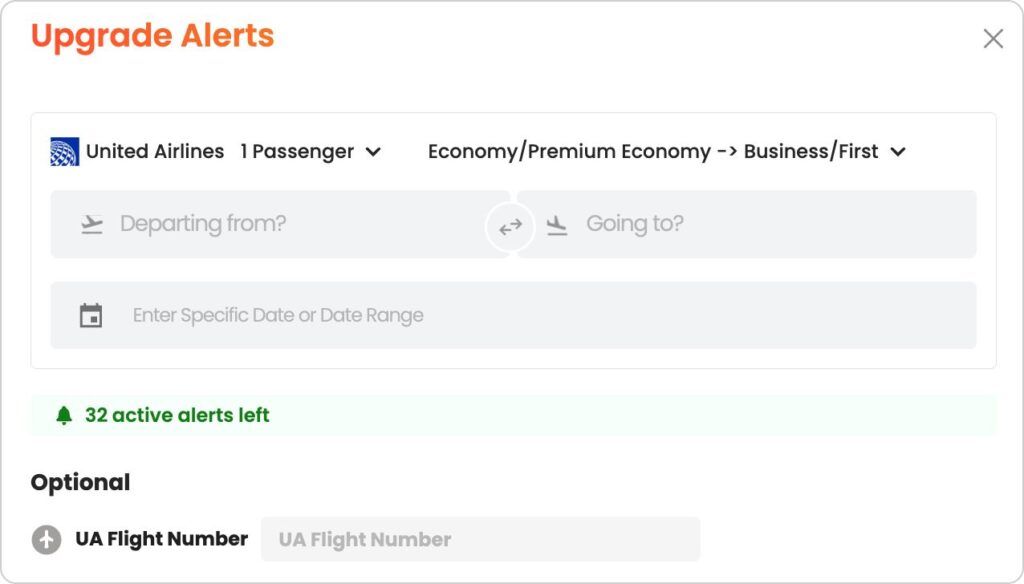
    United Airlines Upgrade Alerts let you track availability for upgrades from Economy or Premium Economy into Business Class or First on flights operated by United. This includes:

    • ✅ Upgrades using PlusPoints
    • ✅ Upgrades using miles
    • ✅ Upgrades using miles with a copay
    • ❌ Codeshare and partner airlines are not included

    Whether you’re aiming for a flat-bed seat to Europe or a domestic first class upgrade, PointsYeah watches availability for you and sends an alert as soon as something opens up.

    How It Works:

    Here’s how simple it is to set an alert:

    1. Select Your Route: Choose your departure and destination cities.
    2. Pick Your Travel Date or Range: You can monitor a single day or a broader date range.
    3. Optional: Enter a specific United flight number if you only want nonstop tracking.
    4. Confirm and Track: That’s it. We take care of the monitoring and send you updates.

    Each day you track counts as one alert and can set up to 32 active alerts at once.

    Scanning Frequency: We start monitoring upgrade availability once per day when your departure is more than a month away. As your travel date approaches, the frequency increases. In the final days before departure, we scan every hour, helping you catch last-minute upgrade openings as soon as they appear.

    What Makes This Feature Special?

    Unlike other platforms that focus on cash fares or general award space, PointsYeah’s Upgrade Alerts are built specifically for travelers using miles, PlusPoints, or miles and a copay. The feature lets you monitor all United-operated flights between your selected cities, giving you the flexibility to track either a specific flight number or an entire route.

    Once your alert is set, we’ll keep an eye on availability for you and send you a notification the moment an upgrade opens up. It’s designed for frequent flyers who value their time and don’t want to miss an opportunity to sit up front.

    Premium-Only, and Worth Every Point

    United Upgrade Alerts aren’t just useful. They’re powerful, and they’re only available to PointsYeah Premium Members. This feature alone can be worth the upgrade for anyone who flies United regularly or wants to travel more comfortably without wasting time hunting for upgrade space.

    But the value doesn’t stop there. Premium gives you access to the full suite of advanced tools designed to help you find better flights, faster, and make the most of every single point you have.

    As a Premium member, you’ll also get:

    • 32 active flight alerts instead of just 4
    • 8-day flexible searches instead for 4 days for both one-way and round-trip itineraries
    • Hotel point alerts with up to 15 active alerts
    • Tools to sort results by your custom point valuation
    • Additional travel features designed to help you book the best deals faster

    If you’re serious about maximizing your points and securing the best award flights, Premium is the way to do it.

  • How to Use Seat Alerts

    How to Use Seat Alerts

    When you book a flight, you focus on getting the deal: the miles, cash price, routing, or program. But once it’s booked, the seat itself can still make or break your trip.

    Even after you’ve locked in your flight, getting the seat you want isn’t always guaranteed.

    Airlines constantly shuffle seat availability behind the scenes. Aisles free up. Exit rows open. Blocked or preferred seats get released. Families change assignments as their plans shift. If you’ve ever refreshed the seat map again and again, hoping your ideal seat appears, you know how tedious it can be.

    That’s exactly why we built Seat Alerts.

    With Seat Alerts, you set your preferences once, and we’ll monitor the seat map for you. Whether you booked with points or paid cash, we keep watching in the background and notify you when your preferred seat becomes available. No more daily checks. No more missed windows.

    Real Situations Where Seat Alerts Make a Difference

    Even when your flight is booked, the seat map often isn’t fully settled. Airlines are constantly shifting inventory behind the scenes, and that creates opportunities if you’re paying attention.

    Seat Alerts are built for moments like these:

    • You booked, but only middle seats were available at the time.
    • Your family or group is split across multiple rows and you want to move together.
    • Exit rows, bulkheads, and extra legroom seats that are held back may open closer to departure.
    • Schedule changes or equipment swaps can free up better rows.
    • Airlines release blocked or elite-only seats as the flight date gets closer.
    • You’re trying to move farther from lavatories, galleys, or the very back of the plane.

    Instead of checking the seat map every day, Seat Alerts monitor these changes for you and send an alert as soon as your preferred seat opens up.

    Works for Cash or Award Tickets

    Seat Alerts track the seat map itself, not how you paid for the ticket. Whether you booked an award flight, paid cash, or used a credit card portal, you can set Seat Alerts on any eligible flight. We monitor the seat map directly and let you know when the seat you want becomes available.

    Simple to Set Up

    You can create a Seat Alert in two ways:

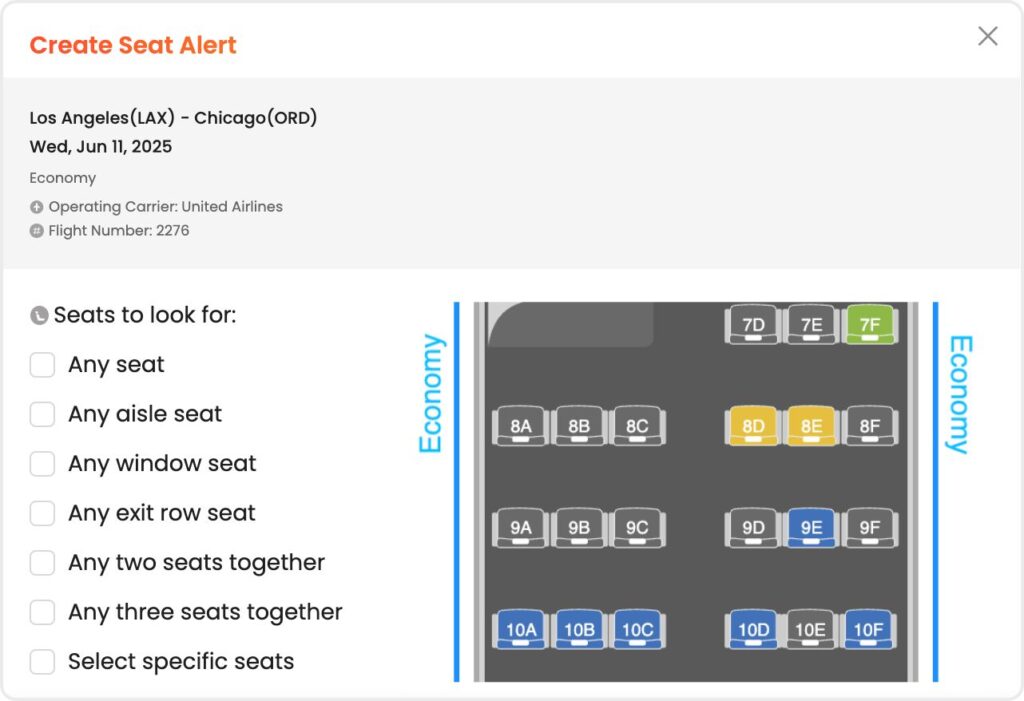
    Option 1: While searching

    • Run a live search and select the flight you’re interested in.
    • Open the seat map.
    • Click “Create Seat Alert.”
    • Select your seat preferences:
      • Any seat
      • Any aisle seat
      • Any window seat
      • Exit rows
      • Two or three seats together
      • Select specific seats manually
    • Once active, we’ll monitor the flight and notify you if your seat opens up.

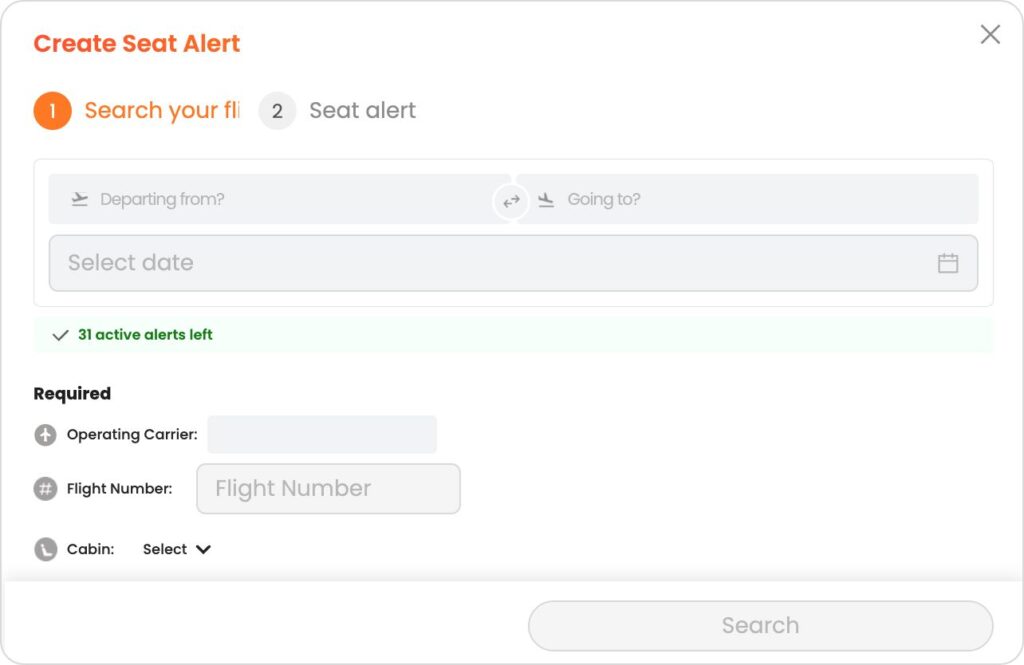
    Option 2: From your account settings

    Submit your alert and we’ll handle the monitoring in the background.

    • Go to Manage Seat Alerts.
    • Click “Create Seat Alert.”
    • Enter your flight details:
      • Departing from
      • Going to
      • Operating carrier
      • Flight number
      • Cabin
      • Your seat preferences
    • Submit your alert and we’ll handle the monitoring in the background.

    Free and Premium Options

    • Free members can set up to 4 active Seat Alerts.
    • Premium members can set up to 32 active Seat Alerts.

    Seat Alerts are live and available for all users while we continue to refine and expand the feature. As we gather feedback, we’ll keep improving coverage and monitoring behind the scenes.

    Seat Alerts are one more way PointsYeah helps take the hassle out of award travel. Combined with tools like live searches, Daydream Explorer, Points Price Alerts, and Hotel Alerts, you’re always one step ahead when it comes to booking smarter and traveling better.

    See you in the skies!

  • How to Personalize Your Flight and Hotel Searches

    How to Personalize Your Flight and Hotel Searches

    Award flights don’t last long. The best deals disappear quickly, and wasting time scrolling through options you wouldn’t book can mean missing out on the ones you would.

    That’s why PointsYeah lets you personalize your entire search experience. With just a few quick settings, you’ll start seeing results that match your travel habits, your points, and your preferences.

    Whether you’re a casual traveler or a points pro, a few smart tweaks can save you hours—and help you book the trips you actually want.

    Here’s how to make PointsYeah work for you.


    Set Your Home Airport

    Most travelers fly from the same few airports again and again. If you live near a major hub like LAX or JFK, you might have dozens of good options. If you’re closer to a smaller airport, you want to avoid seeing results from places you’d never drive to.

    By setting your home airport (or multiple home airports), you tell PointsYeah where to focus. Your results will prioritize departure cities that actually make sense for your travel plans. You’ll avoid irrelevant routes and stop wasting time on flights that are logistically impossible.

    It’s one of the easiest ways to make your searches faster and more focused.

    Set Your Home Airport


    Choose Your Preferred Bank Programs

    This setting is all about showing results you can use, not just deals that look good on paper.

    If you mostly earn points through Chase, for example, it doesn’t help to see a long list of options that require Amex or Capital One transfers. You can go into your settings and choose only the bank programs you use. Once selected, PointsYeah will filter your results to show only the flights that can be booked with those points.

    This is especially useful when you’re trying to book quickly or work within a limited balance. Every result you see is bookable with the points you already have.

    Choose Bank Programs


    Exclude Airlines You Don’t Use

    Not every airline fits every traveler. Maybe you avoid airlines with high surcharges. Maybe you’ve had a bad experience. Or maybe your elite status is with a specific alliance and you prefer to stay within it.

    Whatever the reason, you can remove unwanted airlines from your results entirely. Once excluded, you won’t see their flights in your live search results, keeping your options relevant and aligned with your preferences.

    This is a great way to clean up your search results and avoid clutter that slows you down.

    Exclude Airlines


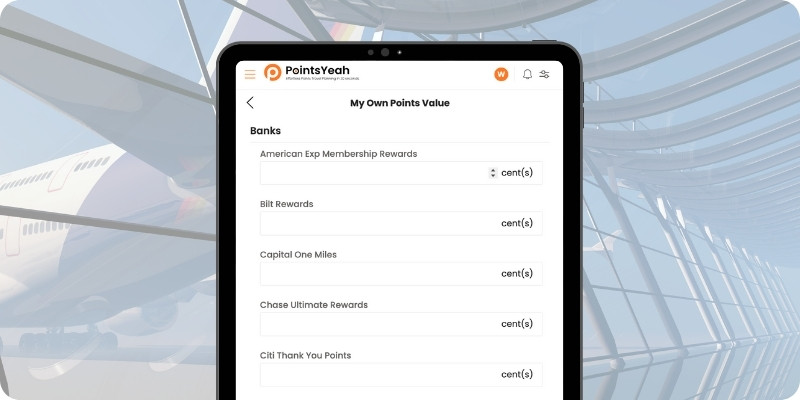
    Set Your Own Points Value (Premium Members Only)

    This is one of the most powerful features for Premium members.

    Instead of using a fixed point value for everyone, you can assign your own custom values for each bank or airline program. This tells PointsYeah how you value your points, and we’ll sort and highlight results based on your personal valuations.

    If you think Chase points are worth 1.7 cents and Avianca miles are only worth 1.2, we’ll factor that into your results. Flights that offer strong value based on your settings will rise to the top, and flights that aren’t worth it will move down the list.

    It’s a smarter way to evaluate redemptions, especially when you’re comparing programs or trying to decide which points to spend.

    Set Your Own Points Value


    Fine-Tune with Advanced Filters

    Once your main settings are in place, you can go even deeper. PointsYeah gives you the option to customize:

    • Cabin class: Only want to see business or first class? Easy.
    • Max taxes and fees: Set a cap so you don’t get surprised at checkout.
    • Airline & Hotel programs: Focus on the ones where you earn or redeem.
    • Corporate codes: Add your company discount codes for hotels.
    • Sort order: Prioritize by lowest points, shortest flight time, or other factors.

    These advanced options help shape every search around your goals, whether that’s getting the best deal, flying in comfort, or avoiding long layovers.

    Fine-Tune Filters


    Why Personalization Matters

    The more you personalize, the more relevant your results become. Instead of wading through dozens of options, you’ll zero in on the ones that make sense for you.

    You’ll book faster. You’ll make better use of your points. And you’ll avoid the frustration of missing a great deal because your screen was full of flights you wouldn’t take.


    Try It for Yourself

    It only takes a minute to update your settings, and the benefits are immediate.

    Personalize My Search

    If you’re already a Premium member, don’t forget to use advanced tools like custom point values and extra alerts. If you’re not Premium yet, this is one of the best reasons to try it.

    Less clutter. Better results. Easier bookings. That’s what personalized travel planning looks like.

  • Getting Started with PointsYeah

    Getting Started with PointsYeah

    Welcome to PointsYeah!

    We believe traveling with points or miles should be simple. Whether you’re a seasoned pro or just getting started, our tools are designed to make booking award travel as smooth as possible.


    To get started, make sure you’re signed in.

    Creating a free account unlocks the full power of PointsYeah—and more features than any other award search tool:

    • Unlimited live searches (up to 4 days at a time for flights, any date range for hotels)
    • 4 Flight Price Point Alerts, 4 Hotel Alerts, and unlimited Explorer Alerts
    • Custom filters and settings to personalize your results
    • … and more!

    Once you’re signed in, explore the platform using the left sidebar and top header to navigate through our products.


    Want to learn more about our tools?

    Check out the full guides for each section of the site:

    Sunrise from a villa in Ubud, Bali

    That’s it! Thank you from all of us at PointsYeah for joining our site and becoming part of a global community of travelers. We all believe travel planning should be easy, and we’re building a product that makes that happen—one search or daydream at a time.

    Have questions or feature requests? Shoot us a message at yeah@pointsyeah.com, we’d love to hear from you!

  • How to Use Points Price Alerts

    How to Use Points Price Alerts

    How Do Points Price Alerts Work?

    Points Price Alerts – Set Your Own Price
    The only alert continuously tracking both the price changes of points and the availability of newly released seats with multiple dates.

    1. What are the Points Price Alerts – Set Your Own Price?

    Unlike other alerts where you either have to enter lots of information to track one flight or only receive an alert once, our Points Price Alerts, we track both points price changes, similar to Kayak or Google’s price alerts, and newly available seats based on the maximum points you wish to spend.

    2. How to set up the alerts?

    You can set up your alerts via the search result page or under my account page with only a few clicks, follow the steps to customize filters and the maximum points you wish to spend.

    3. Is this really free, unlimited, and continuous tracking?

    Yes, our points prices alerts offer unlimited and continuous tracking with maximum 4 active alerts. We will keep searching for available options unless the alert is paused or deleted, or the pre-set travel date has passed. You can pause or delete any alert at any time. When an alert is paused or deleted, or the travel date has passed, the limit will be reset. Keep in mind that many award tickets are fully refundable, enabling you to book now and exchange for a better option if the points price changes.

    4. How are 4 active alerts counted?

    Each individual travel date counts as one active alert.

    For example, if you create:
    • One alert covering 3 travel dates
    • Another alert covering 2 travel dates

    That counts as 5 active alerts in total.

    You can pause or delete alerts at any time, and when an alert is paused, deleted, or the travel date passes, the alert slot becomes available again.

    Each alert can track all loyalty programs at the same time, so you don’t need to create separate alerts for different programs.

    5. How can I get more active alerts?

    Upgrade to our membership to have access to 32 active alerts.

    6. How do I get notified?

    You will receive notifications via email and on the My Points Price Alerts page whenever we detect a change to your alert.